Logos does not successfully open. When I attempt to open L4 for Mac, the logging in window appears, then disappears, and then the logos 4 bible software 4 program header disappears.5700.Archive.zip
Experiencing same problem
Here is the log
0246.Archive.zip
I posted a bug report with both your sets of log files and a link to this thread.
Thanks for posting the bug report.
It just started happening on mine too.
Attached is the latest archive from my log.
Glad I have Logos 4 also running on Parallels!
Jeff
53102.Archive.zip
Same thing just happened to me when it tried to install the update. Tried to reinstall but it's not working. Has anyone found a fix?
Okay, nevermind! It finally opened for me and is indexing. Hope everyone else has theirs working as well!
Erin
Please forgive me for not noticing that you were new to the forums. Welcome. Please feel free to browse and post. There are a great bunch of folks in this worldwide forum – and the developers also pitch in a lot as we work through Logos 4 Mac's Alpha phase.
I'm glad you got your program to work.
Every blessing
Hi Alan,
Thank you for the welcome. I'm new to Logos and new to owning a Mac, so I have a lot to learn! So far the forums have been very helpful and Logos has been invaluable!
Blessings to you.
Hi Alan, Thank you for the welcome. I'm new to Logos and new to owning a Mac, so I have a lot to learn! So far the forums have been very helpful and Logos has been invaluable! Blessings to you.
Hi Erin,
Welcome as well, although I'm not new to Logos (it save me so many times in Grad school when our library had only one copy of the same resource 60 people needed) I'm fairly new to the Mac, you will find the Mac much easier to use and learn. Logos is absolutely the best software for Bible Study. As you learn it will be a great resource. Check out the videos on the Logos Website http://www.logos.com/videos (even though they are for the PC they do help). Mark Barnes did a series that is excellent http://www.4-14.org.uk/logos-bible-software-tutorial-videos. Also this one looks very good and useful with the Mac at http://www.learnlogos.com/.
If you find yourself needing some helps on the Mac here are some resources I've found useful.
Check out the videos at the apple site http://www.apple.com/findouthow/mac/. They have it for Mac Basics; the iLife Suite and iWork. All of the videos can be downloaded on iTunes for later viewing as video podcasts. You can also find some very helpful Video Podcasts for things too (MacBreak Work deals with iWork and is very nice).
Also check out the free classes offered at the Apple Store if you have one locally.
Also as it was previously mentioned post on the forum, everyone here has been great and very helpful! Enjoy learning the Mac and Studying the Bible with Logos 4 Mac!
In Christ,
Philana Crouch
Is there a plist file or something that I can delete to get A21 running again? I have already reinstalled A21 but it still won't start.
Thanks,
Still waiting...
Is there a plist file or something that I can delete to get A21 running again? I have already reinstalled A21 but it still won't start. Thanks, Jeff
Suggest posting logs - forum http://community.logos.com/forums/t/6731.aspx has tutorial - step 1 enable logging should not be needed. Depends on content in posted logs - may have option to delete something. Also wonder if file ~/Library/LaunchAgents/com.logos.LogosIndexer.plist exists ? Likewise wonder if file /tmp/test exists ? (on a multi-user computer, have had issues with /tmp/test).
Keep Smiling [:)]
Mark:
Did you use the same email and password you use when you log into Logos.com?
This appears in your logs: WebServiceClient Error downloading license data. User not found
I haven't made changes to my email or password in several years.
Is there some way to verify which email and password L4 is using at logon?
Hold command down when you launch L4 and the sign-in window will appear.
Specifically, launch the program and then immediately push the command button until you see the sign-in screen.
Thank you for your suggestion.
When I followed your instructions, clicking on the icon in the dock with the command key held down only opened the application folder with the Logos program highlighted. I clicked on the icon in the folder while holding down the command key. This opened the "logging on" window, but the end result was the same--after a few seconds the window disappeared, and then after a few more second Logos disappeared from the top menu.
Hi Keep Smiling for Jesus
Thanks for your post and suggestion. Unfortunately it didn't work. Fortunately I have Logos 4 running on XP with Parallels. When the Mac version is done it will be amazing, especially because then my main reason for having XP and Parallels will be gone!
be blessed,
1220.Archive.zipJeff
Hi Keep Smiling for Jesus Thanks for your post and suggestion. Unfortunately it didn't work. Fortunately I have Logos 4 running on XP with Parallels. When the Mac version is done it will be amazing, especially because then my main reason for having XP and Parallels will be gone! be blessed, 1220.Archive.zip Jeff
1220.Archive.zip
Forum http://community.logos.com/forums/p/18085/136227.aspx#136227 may be interesting since console message snippet shows same crash after BLVSTBIB.LSF file:
6/9/10 6:59:22 AM [0x0-0x33033].com.logos.Logos_Bible_Software_4[604] 06/09/2010 06:59:22 | DEBUG | 3 | LogosResourceDriver | Identifying resource file located at /Library/Application Support/Libronix DLS/Resources/BLVSTBIB.LSF
6/9/10 6:59:22 AM [0x0-0x33033].com.logos.Logos_Bible_Software_4[604] Stacktrace:
I am a new user to L4 and mine is doing the same thing. I do not know what to do with the archive file attached. Cindy Stewart
Hi Keep Smiling 4 Jesus,
Thanks for your tip. I tried it, deleting an .LSF data that I could find. In the mean time, Logos did about an hour and a half of indexing (while the program was not running). I did a restart of my MacBook, but the program still will not launch. I'm open to any further tips.
greetings from Munich,
Hi Cynthia
Welcome to the mac gang.
Your file did not attach - perhaps you would like to try again.
In the meantime don't forget that you can access your library and limited functions through the online version of the program.
tootle pip
Mike
Click the link then press Command. Not the other way around. Just make sure you hit command right after you click the icon on your dock.
Hi Keep Smiling 4 Jesus, Thanks for your tip. I tried it, deleting an .LSF data that I could find. In the mean time, Logos did about an hour and a half of indexing (while the program was not running). I did a restart of my MacBook, but the program still will not launch. I'm open to any further tips. greetings from Munich, Jeff
Idea: create folder within Logging, move existing logos4.log and indexer.log files into folder, restart MacBook, Blue Logos icon should appear in menu bar, after blue icon disappears, launch Logos 4 => If opens, enjoy, otherwise if crashes (or disappears unexpectedly), please post logs.
Note: when needed, new set of logs are helpful for Logos Development team and geeky users (like me) - we need logs to look for interesting messages and further tip suggestions. Some computers have more than 1 issue - fixing an issue allows next one to appear.
Hi, Tommy. Thanks for the clarification. I was able to get the logon dialogue box, but after entering in the correct information, the box disappeared, and then the program bailed as in the past.
I always appreciate a tip, even if it means we're only sneaking up on the problem. I tried your last suggestion, so I guess that means I have a new log file and I've compressed the three documents and they are posted here as an archive.
After moving the files to the new folder and doing a new start, I tried on two occasions to start Logos 4 but still with the same result... just as the main window opens (but only grey, no text fields), then poof it disappears and so does Logos 4. :-(
much grace and peace,
11504.Archive.zip
Hi Keep Smiling 4 Jesus, I always appreciate a tip, even if it means we're only sneaking up on the problem. I tried your last suggestion, so I guess that means I have a new log file and I've compressed the three documents and they are posted here as an archive. After moving the files to the new folder and doing a new start, I tried on two occasions to start Logos 4 but still with the same result... just as the main window opens (but only grey, no text fields), then poof it disappears and so does Logos 4. :-( much grace and peace, Jeff 11504.Archive.zip
Looks like panel settings for resource LLS:2.0.4 (after a layout is loaded) is encountering an unhandled exception.
Forum http://community.logos.com/forums/p/16225/130766.aspx may be helpful (similar situation) => quickly try closing layout window (using cmd+w after login pop-up disappears, then Go Home from menu) or perhaps moving layouts.db from ~/Library/Application Support/Logos4/Documents/<random>/LayoutManager would allow Logos 4 to open.
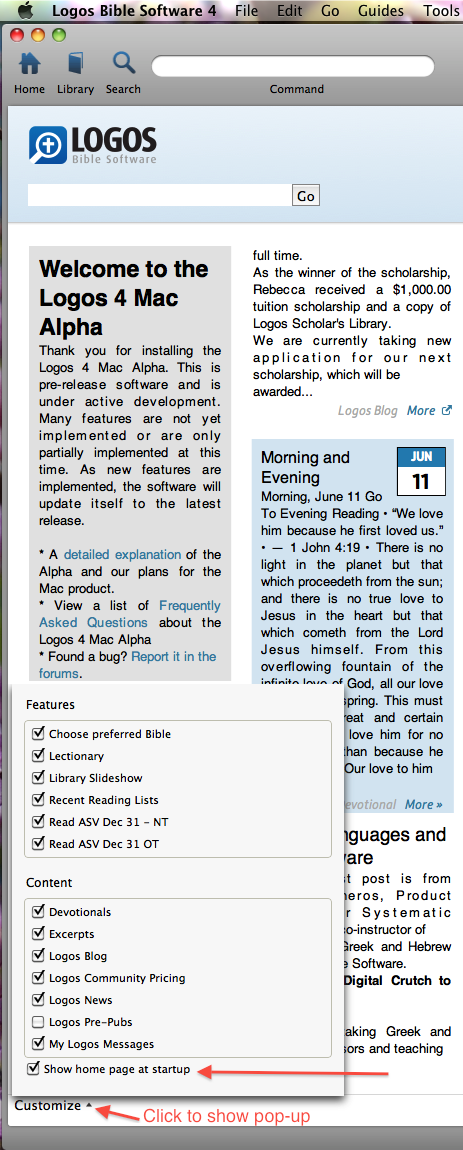
If open, could customize preference on home page to show home page on startup (personal preference after layout issue in earlier Alpha's):
If layout.db file moved, layout information should return after program sync's with servers. Other option is closing Logos 4 and moving layouts.db back, then open Logos again.
I knew that you would somehow find a way to solve this and your last recommendation did the trick!
Curiously I felt that reversing the order might work and that's what I did. I put the layouts.db in the trash first (without emptying the trash), then logged out of my account (at the Mac accounts level), logged back in and then started Logos 4. It started up with a blank grey screen which I closed (command w) and selected "Home" under the "Go" menu. Then the Logos Start Page came up perfectly. Then I went to the Library icon and started opening my preferred Bibles and study Bibles and with each step everything came up without a hitch. So, I must have had either one too many resources open, or one resource (or search) that just wasn't happy.
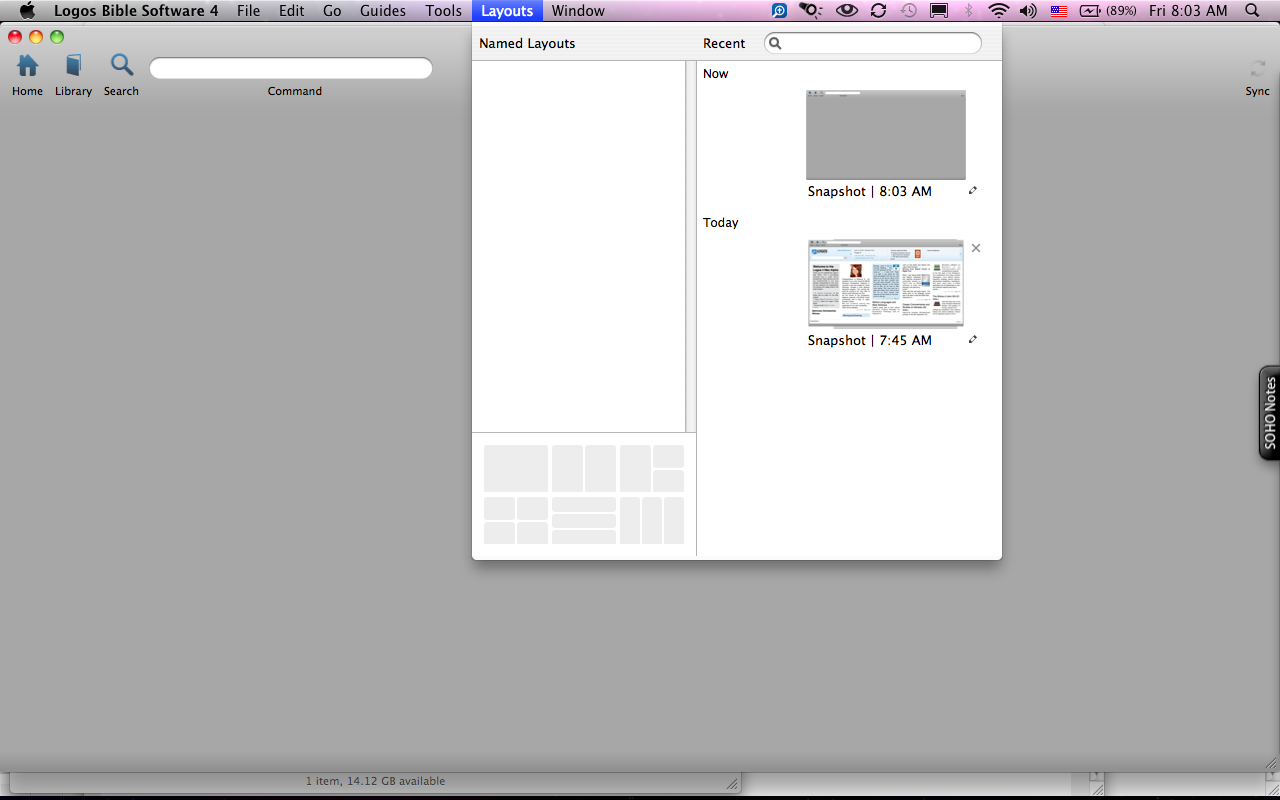
I then closed Logos normally (instead of waiting for it to crash) and restarted it. It went to the Logos Start Page first (my new default) and then I clicked on the Home icon again to go to the Desktop of two Bibles and two study Bibles, that I had open when I closed Logos last time. The field was empty and grey again. I then went into Layouts menu command and saw that the open resources page was also only grey. I've attached a screenshot of it. I don't know, but I somehow expect that Reformation Study Bible may not be happy... ? Right now I opened two Bibles and a study Bible, but not Reformation SB, and we'll see how long it works. Also attached is the latest log.
Just before sending this mail I closed and opened Logos again. When I click on the Home icon to switch from Logos Start Page to my Desktop Layout, it comes up grey again, and will not load what was open when I last closed Logos. Fortunately I saved that Layout as "Standard Reading" and could reopen it from the Layouts dialog box. So it's still a bit hindered, but at least working.
Many thanks,
24748.Archive.zip
Hi Keep Smiling 4 Jesus, I knew that you would somehow find a way to solve this and your last recommendation did the trick! ... So it's still a bit hindered, but at least working. Many thanks, Jeff
I knew that you would somehow find a way to solve this and your last recommendation did the trick! ... So it's still a bit hindered, but at least working. Many thanks,
Thanks for sharing - glad Logos 4 workable. By the way, latest set of logs includes resource LLS:2.0.4 unhandled exception again in console messages.
Suggest restarting Mac and try again - logs posted on Jun 3 appear to be missing console messages between Logos 4 launch and unhandled exception - cannot tell what is causing crash. If Logos 4 still fails to open, please post new log set.
Good Morning from Munich (already Saturday here)!
I checked in my Resources folder and 364 out of all the 808 resources in that folder are LBXLLS files. Do you think one of them could be the culprit? I have 2 Bibles open (Logos4 files) and two study bibles open (LBXLLS Files). The only unusual thing it has done (and it has not crashed yet) is that it took 3 times either double clicking or right clicking in the Library to get Reformation Study Bible to open.
2772.Archive.zip
This fixed my problem as well. Thanks, Jeffrey, for pursuing a solution on this forum so we can all benefit.
Blessings,
Daryl
I'm back up and runnin! Thanks!
Could you install A22 from the release notes, and if the issue continues post the logs of the crash?
Available Now
Build your biblical library with a new trusted commentary or resource every month. Yours to keep forever.