Computer crashed and I replaced it. How do I transfer my license with my resources to the new computer?
Try app.logos.com and log in. It's the web version. Also a desktop version, and a mobile version.
Hi Richard,
The license should be tied to your Logos/Faithlife account, so when you install Logos to a new computer, you can login with your account, it will download your resources except Personal Books unless you upload it.
Thanks, but I installed Logos to my new computer and logged in, but none of that stuff, especially my purchased resources and layouts, downloaded. I'm missing a lot of important stuff.
It is possible that you are not logged into the correct account. You can view your order history at logos.com to verify the resources that were purchased under the account you are using. Another thing to check would be Program Settings within the Logos application. Make sure Download New Books and Use Internet are set to Yes.
Aaron, I have only always had one account, and I logged in on it to get the download. Program settings are as you recommended. Order history only shows Logos 7 in 2017 and Logos 9 in 2022. Strange, because I purchased NIV '84 and have been using it for many years, but it doesn't show up. Looks like I'll be on the phone with Logos on Monday.
The other thing that is worth doing is to leave it overnight and come back once you are certain that downloading and indexing have completed. Frequently when people have asked this in the past it is because downloading and indexing has not completed.
Thanks, GregW, but nothing changed after all night.
Just wondering, are you using Mac? If you do, it might be worth it to check if you're having the Desktop Logos version.
Download from here → https://www.logos.com/get-started
Thanks, Michelle, but I'm using Win 11.
hmm
Something time consuming but useful to try is typing "Rebuild Index" into the command box. Then of course enter the command.
You have a second account (with an @j…com email address) that has most of your licenses. If you sign out of the desktop software and log into that account, all your books (and documents) should show up.
If you don't remember the password or no longer have that email, you can call customer service and have the two accounts merged together. (I would recommend merging the @g….com account into the @j….com account, then changing the email on the latter account to your desired email if necessary.)
Thanks, Bradley. I logged on to the other email address (I had forgotten it), but I am unable to navigate beyond this screen:
Where do I go from here? I can't see a link that actually gets me into my Logos.
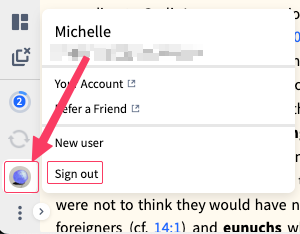
When logged in to the Logos Desktop version, clicking the Profile icon will display a Menu that you can Sign out, then you can sign in with the other account.
Or
You could download Verbum & Logos, using different user account with each one.
As Bradley recommended, (IMHO I agree it's the most suitable), contact the official Customer support to merge two accounts into one.
Thanks all. DMB's solution worked for me. I think I'm up and running like on the old laptop.
Oops.
In case DMB didn't answer your question, for the desktop version, you should just be able to install it and sign in. You'll still have the option to download all your resources.
Available Now
Build your biblical library with a new trusted commentary or resource every month. Yours to keep forever.
I searched for something in the Help Centre, it gave me link to "Part 4: Research your word in lexicons - Logos Tutorials: Study a Word" It says I don't own the resource but gives me a preview, I want this resource, but when I click on the link it gives me a 404: Not Found error.…
Hi All, Just a question - since paying subscribers are promised a "subscriber exclusive" free book each month, what happens when you already own the book on offer? Would Logos consider providing an alternative free book, since this value should form part of being a subscriber? Thanks.
Using Ephesians 2:8 as an example, is there a way to do a morphological search in the Greek New Testament to find all of the verses that contain a demonstrative neuter pronoun without a corresponding neuter noun?
Probably simple enough Q[s] for any Logos Master: What corpus of resources does Power Lookup [PL] display (and method and extent of enlarging it)? So, Google AI suggests "choose Power Lookup to see definitions from your dictionaries or references to that text." And a Logos article is similarly suggestive of a broad search…
I had to replace my PC which necessitated reinstalling Logos. The reinstall apparently updated something so that every time I open a book I now get a marketing side panel named "insights" which I cannot determine how to turn off. I want to permanently turn off the insights - how do I do it? Logos needs to stop adding this…