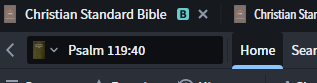
In previous versions to go for example from one version of the Bible to another one, you could quickly get there by clicking the parallel bar adjacent to the entry field, now this icon is not visible for me where can I find it.
Click on the book cover next to the Psalm 119:40 Bible reference.
As @Chris Heil posted Click on the book cover next to the Psalm 119:40 Bible reference.
Note the downward caret next to the boy cover; that indicates the availability of more resources
Available Now
Build your biblical library with a new trusted commentary or resource every month. Yours to keep forever.
When I have the NA28 and English bible linked. Over a study time, when I bring the mouse over the Greek word to see its morphology. For example Mouse overs over eisin and it automatically parses it. Great tool. However, Over time, say 30 mins, the software slows down and when I attempt the same process, logos seems to…
How do I find all occurrences of a Hiphil, infinitive construct where the initial 'he' has been replaced by a preposition (syncopation)? All of my efforts have failed so far. Anyone know the steps in Logos?
Probably simple enough Q[s] for any Logos Master: What corpus of resources does Power Lookup [PL] display (and method and extent of enlarging it)? So, Google AI suggests "choose Power Lookup to see definitions from your dictionaries or references to that text." And a Logos article is similarly suggestive of a broad search…
My pastor taught me how he prepares sermons and the steps he takes to get to Sunday. I took his workflow and recreated it in Logos, but I want to be able to pull in my tools and resources into it. How can I improve the workflow? See the link. https://flshare.net/n79ad5
I frequently import Sermon and Podcast transcripts into Logos as a personal book. I would like to edit the .docx file before its imported to optimize its searchability. Is there any additional threads, documentation, training, tips, or tricks on this other than what's in Logos Help?