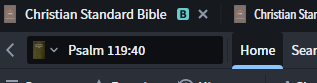
In previous versions to go for example from one version of the Bible to another one, you could quickly get there by clicking the parallel bar adjacent to the entry field, now this icon is not visible for me where can I find it.
Click on the book cover next to the Psalm 119:40 Bible reference.
As @Chris Heil posted Click on the book cover next to the Psalm 119:40 Bible reference.
Note the downward caret next to the boy cover; that indicates the availability of more resources
Available Now
Build your biblical library with a new trusted commentary or resource every month. Yours to keep forever.
In the mobile app, how do I compare Bibles other than those in my top 5? Even after reading through the help article on using the Text Comparison tool in the mobile app, I'm still at a loss as to how to choose a different collection of Bibles for comparison. I have multiple collections of Bibles set up in the desktop app:…
How to Export Bible Verses With Verse Number Left-Justified?
I purchased some standalone videos on Faithlife TV a while back (not the Faithlife TV Plus subscription). What will happen to those? Will they be accessible inside Logos if the FL TV app goes away? Thanks!
I’m looking for a Traditional Chinese (as opposed to a Simplified Chinese, this isn’t an ideological question) Catholic missal. Does anyone know if Verbum has any such thing?
Dear Folk, Doing a course, and have a suggested search phrase that doesn't work for me. I'm doing something wrong. Search syntax has changed since some of the older screencasts for older courses. How do I search for the any of the first terms near any of the following terms? Suggested search phrase: [(<Topic Divine…