I am a disabled user of the Logos free edition.They have it in the dark mode, how do I get it back on ?
Welcome @Robert W.King,Jr.
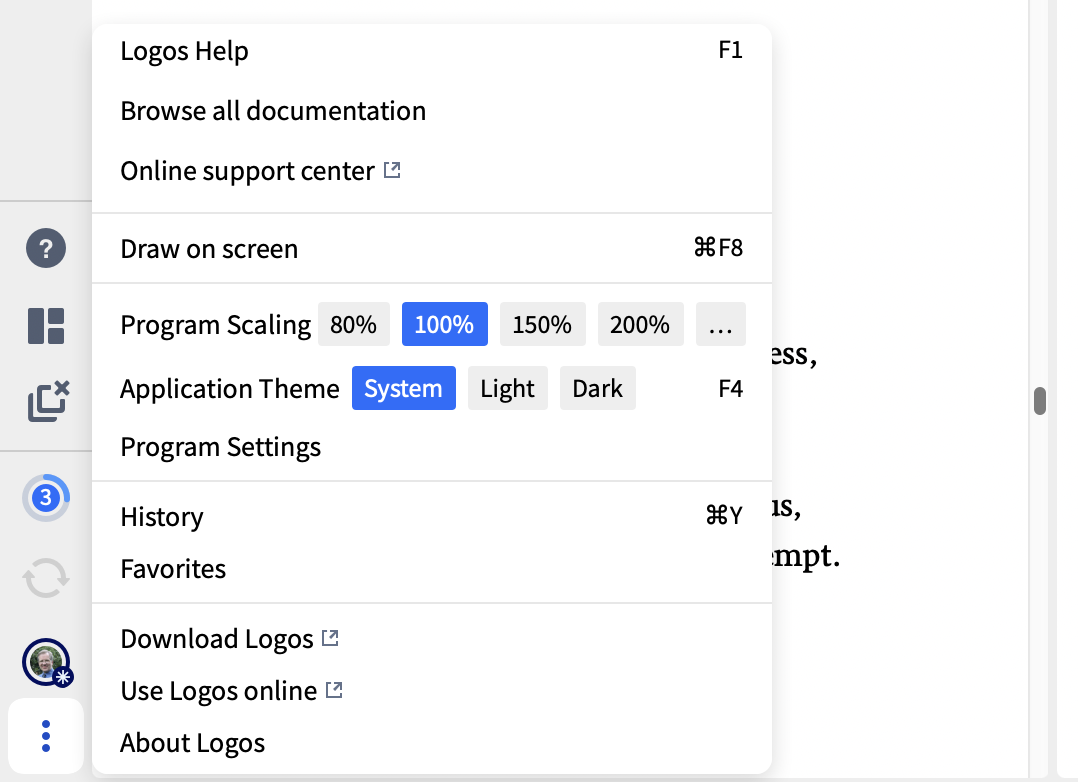
You can switch between dark and light mode by clicking the three dots icon at the bottom left / top right of the screen and selecting the required application theme option
I believe that, with the free version, you need to restart Logos for this change to come into effect
Graham
Hi @Robert W.King,Jr. ,
F4 is the shortcut key to switch faster.
Hope this helps 😊
I mainly use dark mode and rarely switch but this is a nice tip … thanks! 🙃
Available Now
Build your biblical library with a new trusted commentary or resource every month. Yours to keep forever.
Why can't I add my layout to the dashboard, the layout shows there it has the tick, but it does appear in the dashboard.
I am running Logos on my MacBook, and have been for some time, and I have been wondering for a while why it seems like every time I load Logos, and every time I switch Layouts, it goes from Full Screen to not full screen. Is there some setting I'm missing? I have, in the settings, set to open to "most recent layout -…
I want to read the Summa Theologica in one year. I tried to set up a reading plan in Logos, but there does not appear to be an option for how many days I can set for a reading plan. When I select every day, it provides a reading plan that takes over 800 days. I want to do it in 365 days. Is there any way to adjust the…
I am working with Hebrew. How can I find all occasions of a word based on a specific triliteral root? For example I want to find the occurrence of every time "הגה" is used in the Psalter - regardless of the vowel pointings or how the word functions in any given passage. What is the work flow for this? Logos defaults into…
I currently use the Courses tool on desktop to view my Mobile Ed courses. I want to start pivoting this toward my iPad. What is the best way to accomplish this on my iPad? Thanks!