I am a disabled user of the Logos free edition.They have it in the dark mode, how do I get it back on ?
Welcome @Robert W.King,Jr.
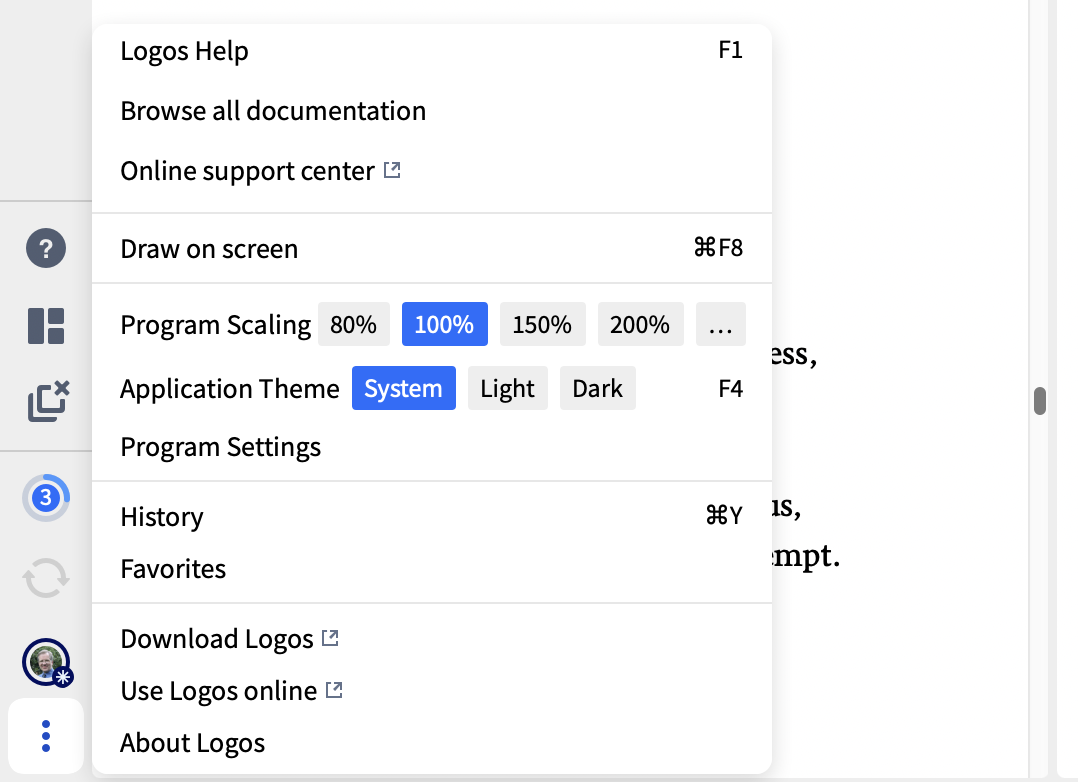
You can switch between dark and light mode by clicking the three dots icon at the bottom left / top right of the screen and selecting the required application theme option
I believe that, with the free version, you need to restart Logos for this change to come into effect
Graham
Hi @Robert W.King,Jr. ,
F4 is the shortcut key to switch faster.
Hope this helps 😊
I mainly use dark mode and rarely switch but this is a nice tip … thanks! 🙃
Available Now
Build your biblical library with a new trusted commentary or resource every month. Yours to keep forever.
I want to find all 3 masc. sing. suffixes in the Hebrew Bible that are written with heh. How can I search for this?
How can I search all Infinitive Construct forms that occur at the beginning place of each verse in the Old Testament?
I really love the feature where I can look up a NT word in the wider context of the Greek language. I was dismayed to find only "Wikipedia" as a source in place of the Tufts University site that hosted Perseus. I realize online resources are time limited, but is there any alternate resources in Logos that can function…
I love the sepia background on my iPad. As far as I can tell (I've scoured the settings), sepia is not an Application Theme for Logos desktop. Does anyone know if there are any plans to introduce this feature to Logos desktop? Thanks.
The emails I get for new forum messages often have no content except the poster's subject. This seems to be a new phenomenon. Is this intentional? And while we're talking about the forum, to post a message requires me to choose certain things, such as platform, that do not apply.