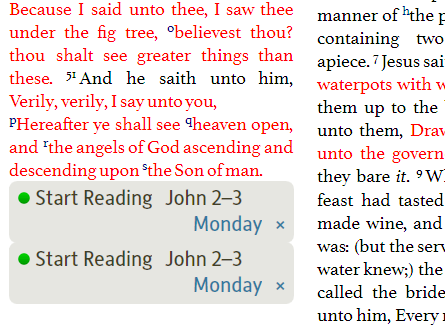
Does anyone else have duplicate reading plan entries?
Also see http://community.logos.com/forums/t/31220.aspx
Although not clear that these were duplicates also consider the case at http://community.logos.com/forums/t/32319.aspx
Thanks Dave,
The update must have duplicated some existing reading plans. I deleted them and it worked!
Thanks
A duplicate reading plan name always gets generated when you do choose Reading Plan from the File menu after already creating a reading plan. If you close it right away (say you realized that you meant to open the existing one to edit it, rather than create a new one), it doesn't get saved. But if you click "Go" on the new one, it will get populated and saved. Here's the temporary state when you first choose File > Reading Plan a second (or third...) time:
If you truly intend to create a new reading plan, it's up to you to change its name by clicking the pencil icon after the (2) and typing in something new.
As others have mentioned in that other thread, you can delete any accidentally created reading plans by right clicking them in the Open side of the file menu and choosing "Delete." You can filter the file list on that menu to only show reading plans by typing "reading" (or some unique substring of that) into the find box at the top:
also consider the case at http://community.logos.com/forums/t/32319.aspx
As referenced, the case mentioned here (http://community.logos.com/forums/p/32319/240929.aspx#240929) was not a duplicate plan.
Graham
Available Now
Build your biblical library with a new trusted commentary or resource every month. Yours to keep forever.