I love to mark up my Bibles and books, I know in Logos 3 on the PC we couldn't print those. Will there be a way to print that or even just have the option to copy & paste it into Pages? This would be very helpful.
printing support will come in a future release.
That will be wonderful thanks!
Joe,
Printing support that INCLUDES printing (or copying/pasting) highlighting????
Kevin,
that IS a pleasant surprise!
Would be really nice indeed. I hope it will be on the mac version soon!!
To be clear, and this is not a comment on the subject at hand, just the source with which Kevin got his information. Seeing that post is no guarantee of seeing it in the system. That image was taken from a location from which the company takes suggestions (http://logos.uservoice.com/forums/42823-logos-bible-software-4)If you will notice the author was anonymous which means any random user posted that as a desire not a proclamation of plans. I'm not saying it will or will not happen as I am not privy to that information, however I wanted to make clear that what was posted by Kevin does not guarantee of its implementation.
To be clear, and this is not a comment on the subject at hand, just the source with which Kevin got his information. Seeing that post is no guarantee of seeing it in the system.
I realize that nothing is guaranteed but does "planned" mean that Logos is planning on doing this? Isn't Logos the ones who put in the status tags?
Ahh, this is so. I stand corrected. I was familiar with the venue for suggests as a one way form of communication. I'm glad i was wrong. [:)]
Ahh, this is so. I stand corrected. I was familiar with the venue for suggests as a one way form of communication. I'm glad i was wrong.
As I understand it is Bob Pritchett who puts the "started" "planned" tags etc. on UserVoice.
Users can post items, but you guys are correct that Bob P. approves the status of each item.
I am a Precept Leader and mark my Bible with Inductive symbols and have been waiting along time to be able to print text with my mark ups. Today I printed my first marked up chapter and it was beautiful. Thank you Precept for the print support you promised. One of my biggest helps in preparing for my class sessions and personal study. Way to go Logos. Thanks Peggy in Orange Calif.
Peggy, How did you do it?
Logos printing is WYSIWYG (What you see is what you get) so if the display of highlighting is toggled in the program then bringing up the Print/Export dialogue should have all the highlights applied to the passage.
Peggy, How did you do it? Logos printing is WYSIWYG (What you see is what you get) so if the display of highlighting is toggled in the program then bringing up the Print/Export dialogue should have all the highlights applied to the passage.
Welcome Francisco [:D]
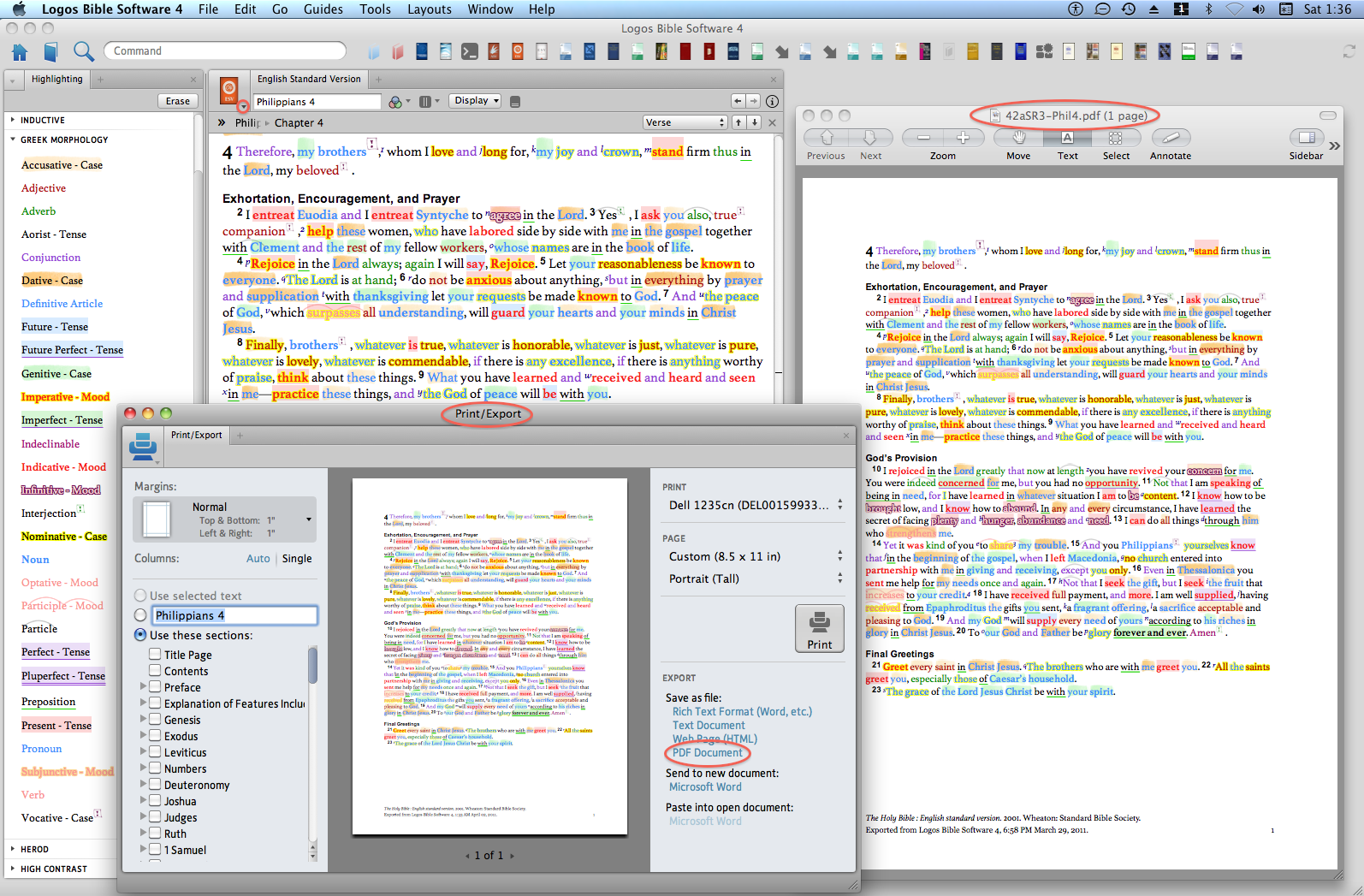
Screen capture shows PDF created using Logos 4.2a SR-3 Print/Export from ESV with Visual FIlter highlighting (using Logos Greek Morphology).
The screen capture has Logos Bible Software 4 window with Highlighting (used in Visual Filters) & ESV, in front is Logos 4 Mac Print/Export window (clicked on red circle by ESV book cover, then clicked Print/Export), on right side is PDF file with highlighted ESV Bible verses (open in Preview):
Keep Smiling [:)]
Welcome Francisco Screen capture shows PDF created using Logos 4.2a SR-3 Print/Export from ESV with Visual FIlter highlighting (using Logos Greek Morphology). The screen capture has Logos Bible Software 4 window with Highlighting (used in Visual Filters) & ESV, in front is Logos 4 Mac Print/Export window (clicked on red circle by ESV book cover, then clicked Print/Export), on right side is PDF file with highlighted ESV Bible verses (open in Preview): Keep Smiling
Welcome Francisco
Keep Smiling
Fantastic!!!! problem solved! thanks Keep Smiling.
Available Now
Build your biblical library with a new trusted commentary or resource every month. Yours to keep forever.