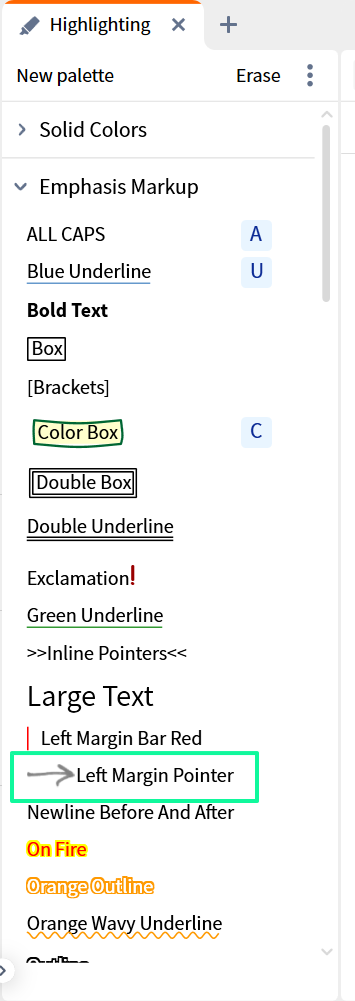
I'm seeing what looks like a hand drawn arrow next to a Bible verse in my Bible window. I have attached a screenshot. How did it get there and what does it mean? (I have a Max subscription.)
Thanks!
This is either a highlight or a visual filter
It looks like it has been drawn from the Emphasis Markup section of the Highlighter Tool.
Try turning off Highlights and / or Visual Filters and see which causes it to disappear.
Nevermind! I figured it out. It was a highlight feature. The problem was that I was trying to left click and right click on it and nothing was happening, so I couldn't figure it out. However, when I clicked and dragged over the verse to highlight it, the highlight popup showed the circle-with-a-slash icon. This tipped me off that there was a highlight. When I clicked on that icon, the arrow went away. [I don't remember putting that highlight there, but I might have during some training exercise.]
I hope this might help somebody else with a similar question.
You found it, Graham! It was a highlight feature.
Thanks for your response!
Available Now
Build your biblical library with a new trusted commentary or resource every month. Yours to keep forever.
Is there a way to stop highlighting from adding a note each time I highlight something? Vince.
Will there be Verbum 2026 Libraries? Will there be German 2026 Libraries?
Biblia Hebraica Stuttgartensia (Amstelodamensis) (BHSA) appeared in my library last month so I assumed it was part of the monthly books I temporarily get each month with the Max plan. However, it still shows up this month and has a temporary license. I clicked on the Laern More About It link and it took me to a 404…
I am planning to build a library for my son. I already purchased some packages but he doesn’t have access to basic stuff like Greek/Hebrew word look up. How can I purchase this feature. He doesn’t need cloud based features and I am not looking for subscription
As far as I see, the Carta Understanding series is no longer available in the shop. Is this related to past issues (see here)?