Or can one do this? Thank you.
Hi @Donnie M Peedin - and welcome to the forums
You can print parts of resources - guidance on doing this is available here
Please note that, due to copyright reasons, there are restrictions on how many pages can be printed at a time.
Graham
You use the Print/Export functionality, most easily invoked by Ctrl-P (or the Mac equivalent, possibly Cmd-P?). This is found in the subscribers' toolbar under Share / Print/Export, in the classic toolbar as part of the panel menu (three vertical dots top right of the resource panel)
If you want, select beforehand the portion you want to print, but that's optional, if it's a chapter or such you may select it in the Print/Export panel that comes up.
The problem is: It will only let me print one page at the time. I bought a New International Version commentary on Colossians. Then only letting me print one page, it will not print all the words. I'm not too tech savvy.
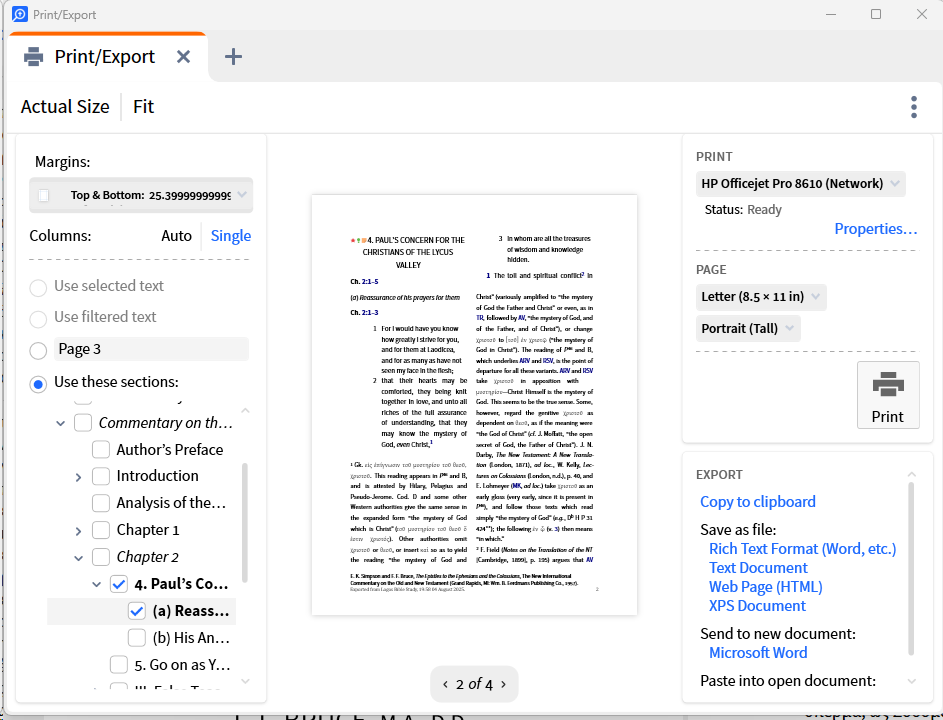
Can you post a screenshot showing what you see in the Print / Export panel?
Something like this:
More work but in Microsoft Word, copy and paste all the sections you want without footnotes just the last one and then print away!
Available Now
Build your biblical library with a new trusted commentary or resource every month. Yours to keep forever.
Biblia Hebraica Stuttgartensia (Amstelodamensis) (BHSA) appeared in my library last month so I assumed it was part of the monthly books I temporarily get each month with the Max plan. However, it still shows up this month and has a temporary license. I clicked on the Laern More About It link and it took me to a 404…
Almost 15 years ago, I started using Verbum. I bought a nice sized library, went through the setup, thought I had everything the way I wanted it. Now, I want to simplify. My Initial startup panel has an option for the Catholic Daily Lectionary. I select the date I want and Verbum opens a layout that has all my bibles…
I will be helping two of my friends get oriented with Logos. One of them has a Logos Premium subscription but has not yet been able to get into Logos much. The other one has no Logos experience at all but seems very interested in learning about it. He may have downloaded the free version - but I don't know that for…
Hello everyone. In my laptop, when I click on the icon in order to open it , the big blue square stays for 5 seconds and closes, and the app won't open. As you can see in my apps list, it was installed on the 5th. I recall when doing this, a message said something like an error, and have been trying to uninstall it…
Is there a way to stop highlighting from adding a note each time I highlight something? Vince.