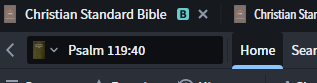
In previous versions to go for example from one version of the Bible to another one, you could quickly get there by clicking the parallel bar adjacent to the entry field, now this icon is not visible for me where can I find it.
Click on the book cover next to the Psalm 119:40 Bible reference.
As @Chris Heil posted Click on the book cover next to the Psalm 119:40 Bible reference.
Note the downward caret next to the boy cover; that indicates the availability of more resources
Available Now
Build your biblical library with a new trusted commentary or resource every month. Yours to keep forever.
I just purchased The Complete Word Study Old & New Testament (2 Vols.) for my Logos Library. In the past we bought the "The Complete Word Study: New Testament" (Just the New Testament, not the bundle) for my Wife's account , and if we opened the Bible in Logos on her PC, and right clicked on a word in a passage, and then…
I was wanting to create a Exegetical Fallacy cheat sheet that I could carry with me. There are a lot of books and sermons etc. contain these fallacies. A lot of people don’t have ability to learn greek or have access to or can afford devices. Error occur from not being able to use resources properly or out of date ones. My…
I Had to re-install my Windows. When I re-installed LOGOS it needed to download my books. It only downloaded up to 20%, then it stops. Restarting and re-installing doesn't help
Is there anything on Logos that would give me pronunciation of Hebrew words? Transliteration is ok but an actual voice recording or such would be better
Recently when I tried to report typos in the books (especially the Bible), I found that when I select several words, right click and when a menu appears, the Report Typos button at the bottom of the menu is gone? Both on Widows and Mac. There's no such an option any more😮. Am I understanding it correct?🤔Thanks.