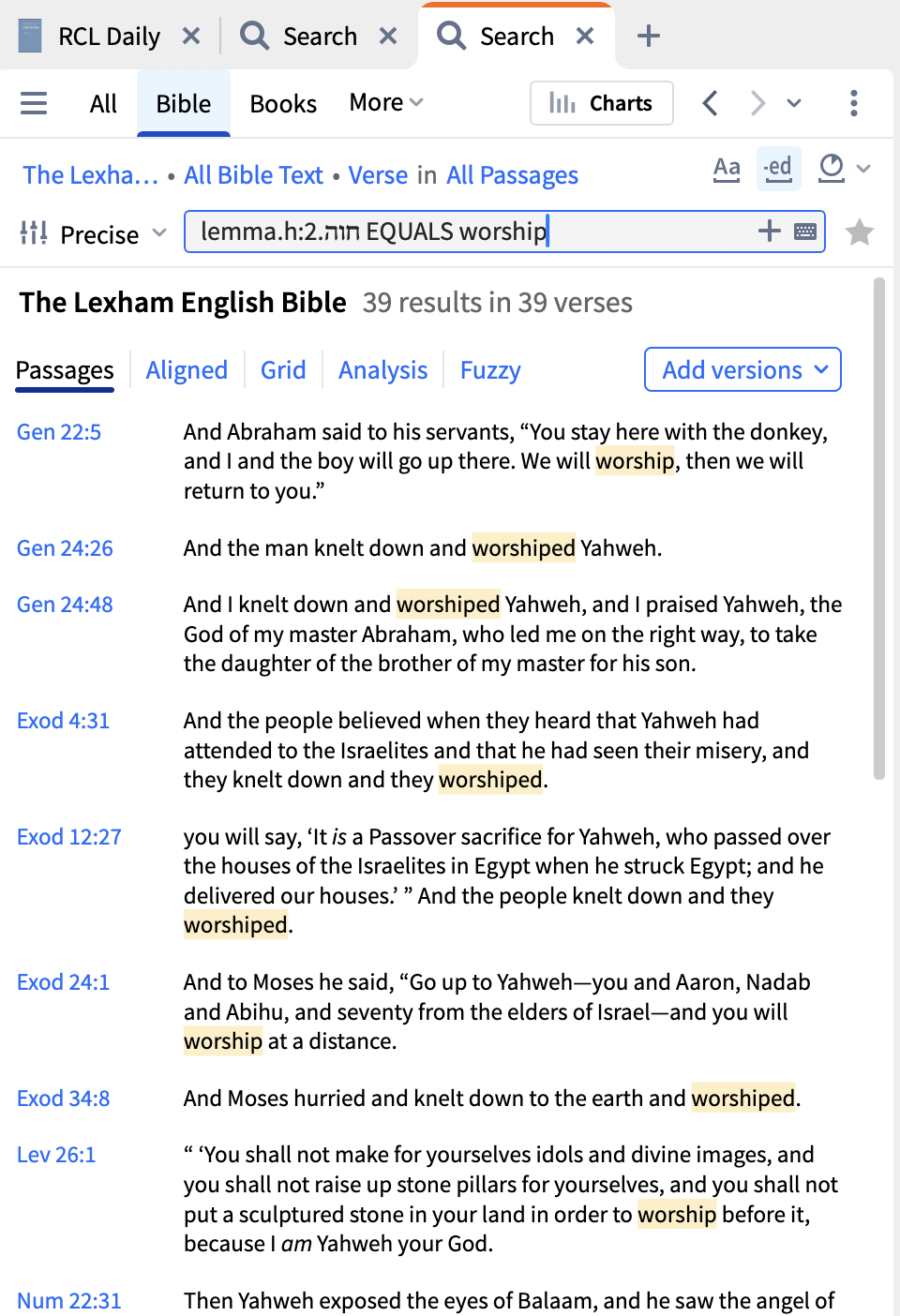
What is the syntax for a Hebrew search?
Where is it described in the Docs?
There is some information about a Hebrew morph search here and more information here but can you provide more details as to what you are looking for?
in lemma.h:חוה.2
I want to see times when this word is translated worship
In Greek I add EQUALS worship
But the right-to-left thing messes me up
I get an error, or no output
The same principles apply to Hebrew as to Greek
To avoid the left-to-right issue, try entering the lemma and then pressing Ctrl/Cmd—right arrow before entering the rest of the search term
I enter "lemma.h:חוה.2"
When I enter space, the cursor jumps between the colon and the 2
I have not found how to get it to go to the right end and then to add the EQUALS *
OK, I copied it from the reverse interliniar with right click, "copy reference - search".
Then pasted it into the search and it would not stay at the right end.
I got it to work by pasting it into Notepad++ first, then copying it from there and pasting it into the search.
This is not needed in Greek.
I enter "lemma.h:חוה.2"When I enter space, the cursor jumps between the colon and the 2I have not found how to get it to go to the right end and then to add the EQUALS *
You should be able to just keep typing and it will be in the right place. The cursor positioning is due to the weirdnesses of mixing left to right and right to left text.
You can hit your end key on the keyboard, and the place your cursor ends up is actually at the end, even though it's not at the extreme right side of the text.
If you copy it from the reverse interlinear with right click menu and select "copy reference - search"
Then pasted it into the search and it will not stay at the right end for me.
I do not "type it in, I paste it. But Notepad++ removes the "right to left" of Hebrew.
And what happens if you paste it in and then continue typing the rest of the query?
I get "lemma.h:חוה.2" from the reverse interlinear
with right click menu while on the Lemma and select "copy reference - search"
I PASTE it into the search.
When I enter space with the cursor sitting at the right end,
the cursor jumps between the colon and the 2 of "lemma.h:חוה.2"
Yes, and when you continue typing the rest of your query?
depending on spaces I get an error, or no output
If I PASTE to Notepad++ and copy from there the right to left is removed and it works
I just used the word study feature. find a passage in OT where 'worship' is used, right click, pick word study and use the translation feature with the pie chart
OK, When I PASTED the string in the cursor went to the middle of the search string.
Thinking it need to to be at the right end, I put the cursor at the right end and clicked to select the right end, then hit space. That causes my issue.
When I PASTED the string in and immediately hit "space EQUALS worship" it was fine.
Every now and again I take time out to play with my "mental blocks"! 🤔
So I guess I was shooting myself in the foot!
👍️ That's what I was trying to get at. You can also use the End key to go to the "end" of the line (which will look like it's in the middle, but will work as desired).
Thanx a bunch
Available Now
Build your biblical library with a new trusted commentary or resource every month. Yours to keep forever.
Anyone know the source of transliteration for nouns in the translation ring of the context menu (and in EG), whether accessed from an English (ESV) or Hebrew Bible (LHB)? 2. Also, is it possible that the Logos version of some resources add this translation ring transliteration (that is, the hard copies do not contain it)?…
Is there any way to constrain a Web App bible search to specific books of the bible, as in the desktop? I see no obvious way to do it. I find it hard to believe this is as impossible as it seems as this is pretty basic functionality. Want me going to biblegateway.com? 🤣 I wanted to search only the book of Acts for…
How to back up personal books? and how to copy personal books from my desktop to my laptop?
My Mac is running low on disk space, and it looks like the Library/Application Support/Logos4 folder is taking 20GB in /Data and 15GB in /Documents. I'm guessing that one of those is my library and the other is my notes and highlights. Is there a way to see the size of all the things in my library so I can get rid of those…
Hi all, even though I am subscribed for Logos emails, I have not received any promotional emails lately. Please could anyone let me know when they receive the coupon (I think it's expected tomorrow)… Thanks…