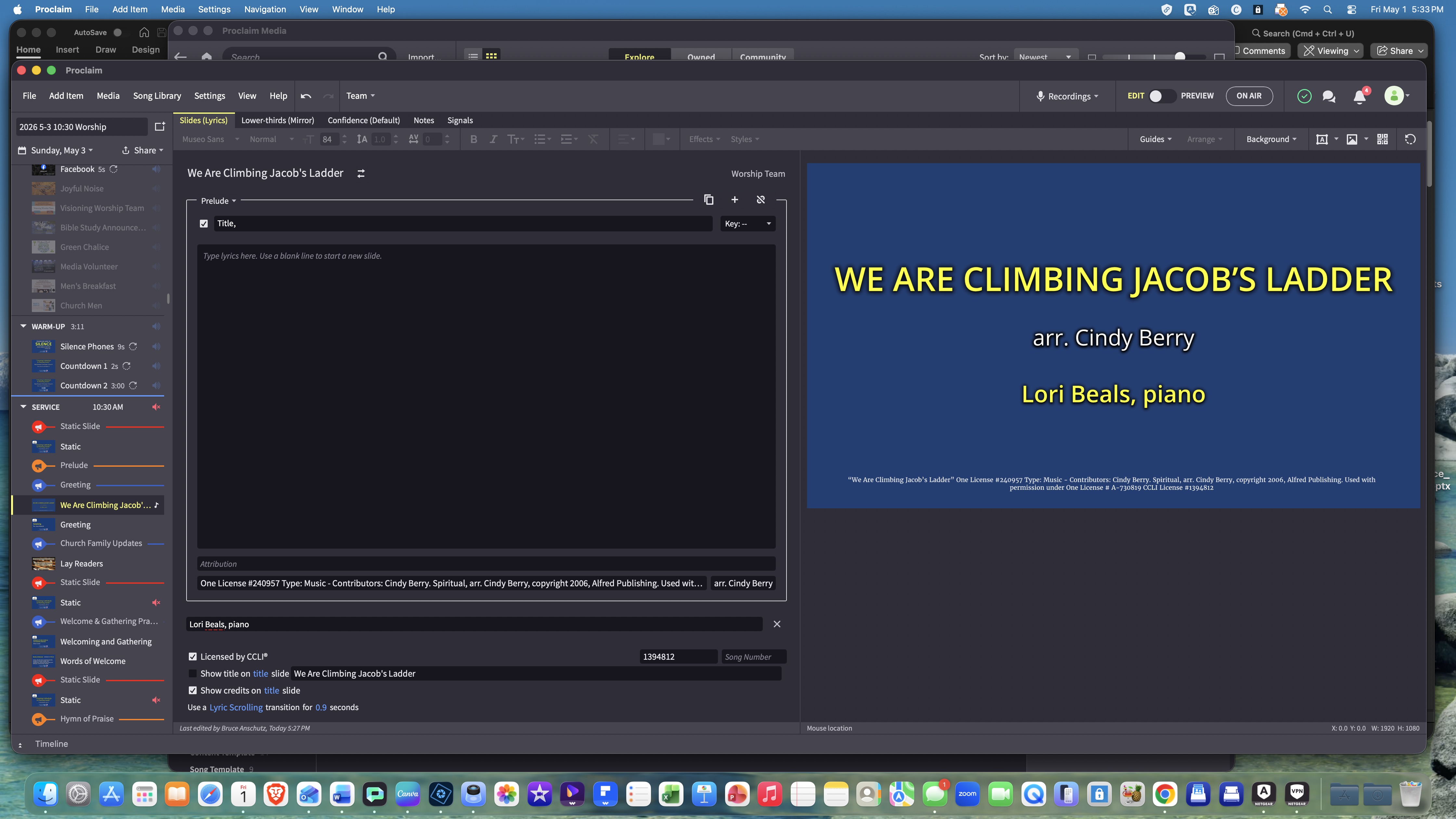
Has anyone figured out a work around for the new bug in the lower third tab that no longer shows the Title of the song? I've tried adding a text field and even that won't show. All I can get is the hymn # and copyright fields to show!
that’s very odd! Thanks for the report, we will see if we can reproduce this ourselves.
Thx @Jordon Sjodin Please let me know what you find
I just got an update today and now our NDI send to live stream will not show text box texts (example: Verses 1 & 2 only) or the copyright information for the songs. I opened last week's presentation that worked correctly last week, and now it has the same issue. Can we roll back 2 updates?
@Michael Atchley you can rollback via the download links available on the prior release here: https://faithlife.github.io/ProclaimReleaseNotes/4.17/ReleaseNotes.html
Sorry for the disruption, we will get this fixed asap
Looks like if you use the title slide check box instead of adding title in the verse order it does work. But additional fields are still not showing on the title slide
^ with the checkbox checked
the reason I use title in the verse order is because I want a title slide and have the title show on every slide. If I do it the way you suggest I cannot get the correct behavior.
Also, in the lower thirds tab I used to be able to delete both the title and hymn # fields but there was an update that stopped that from being able to be done. Now you have to take the text box, make sure the font is white and then change the opacity to TRY to make it disappear. The only problem is that were left with 2 black text boxes that I have to drag to the very top of the slide to get it out of the lower thirds view on our live stream. PLEASE FIX THIS ASAP
Yes, we are taking a look right now. That suggestion was only ever meant as a last minute fix if others showed up on this thread.
I have had such a terrible time with this update and how it makes lower thirds basically unusable without significant extra time reformatting the text when it was relatively easy to do before this update.
I think I have figured out the work around for how I use lower thirds but it seriously is adding a minimum of an hour to my putting together my slides for services. Last Sundays lower thirds were not usable. And as myself and another person on our tech/presentation crew figured out the work around. I am not certain if it will be worth it on a regular basis. Please figure out what the bug is quickly.
If it isn't fixed quickly, we will have to stop using lower thirds and will start looking for other presentation software. Proclaim was such an improvement over Power Point—now not so much.
I did put in a ticket last week and heard back and had a bit of response and request for more information, but I haven't heard back at all since Thursday
of last week
What was the work around you mentioned?
reducing the type size until the lines are on one slide and match the slides on the main. Prior to the update it worked automatically. And changing line breaks would make the slide more legible without any manipulation.
Now, if you change any line breaks on either the main slide or on the lower thirds side, all of the slides get misaligned and create that loop. So you have to carefully evaluate each slide (main and lower thirds )to make certain they are aligned.
and I also discovered if you have any text box on the main slide—such as saying what verse is currently being sung (Verse 1, Verse 2, Verse 3, chorus etc) that each and every main slide had all of the text boxes on it, so that you couldn't read it. Each was overlayed on the other for each slide. So I had to remove all of those signposting text boxes I put in. I think it also happened on the lower thirds that way too. The last update or two have been very frustrating.
@Office for First Congregational UCC Alexandria MN
hat was the work around you discovered?
@Jordan Sjodin Has the issue with the lower thirds no longer being able to show titles been resolved? If not, is thare any type of work around that has been discovered? Because of this new behavior, we cannot use lower thirds which is greatly hindering our on-line presence
Yes, the title slide fix is queued up to be release soon. I am not sure what is happening with this other issue in the comments. Taking a look
@Office for First Congregational UCC Alexandria MN I think I see what is happening. We are taking a look right now.
Our new 'Text scaling' button is messing with you.
The old default was scaling on, so to get your Proclaim to behave normally again, ensure this button is up in your toolbar:
Essentially, your issue is stemming from a combination of custom alt-content text and having text scaling off.
We are working on a fix right now, but if you turn scaling back on, everything should work like before!
Sorry for the issues.
Update on my comments from May 2. In a song, the Slides (Lyrics) tab shows the credits on the last page:
But on the tab we use to send lyrics to Live Stream vis NDI, the credits do not appear:
I was surprised Sunday morning that even though the credits do not appear on the livestream lyrics tab in Edit mode, they do come across NDI into our live stream:
This means that we have no way to preview how it will appear before going live.
Also, we use a separate title slide for each hymn, sometimes with a text box with instructions, such as "verses 1 and 2". These text box instructions are not visible on the Live Stream Lyrics tab in Edit mode, and they also DO NOT come into the live stream via NDI. This all used to work. What happened?
These text box instructions are not visible on the Live Stream Lyrics tab in Edit mode, and they also DO NOT come into the live stream via NDI. This all used to work. What happened?
This sounds like the same issue that Bruce is experiencing. Essentially, some changes we made to handle our new "flow content/fixed font size" resulted in these custom fields and title/credits not showing up properly for alternate content. W
Made a post here for others in case they run into something similar
https://faithlife.com/posts/6330768
Jordan, the "tT" fix above by itself had no effect, but for a title slide with a text box, I was able to get the text box to show on the Live Stream Lyrics tab using "Restore original".
However, on a song slide with "tT" turned on, "Restore original" did not cause the credits to appear on the Live Stream Lyrics tab. Still "flying blind".
Available Now
Build your biblical library with a new trusted commentary or resource every month. Yours to keep forever.