L4 is not consistently remembering the global Font/size/etc settings after closing & reopening L4.
Global setting = those set in a Note File when everything is deselected (i.e. when you hit Esc while in an active Note File window). See this article in this temp wiki page (wiki page is under construction at this time)
Below is a means to reproduce these effects:
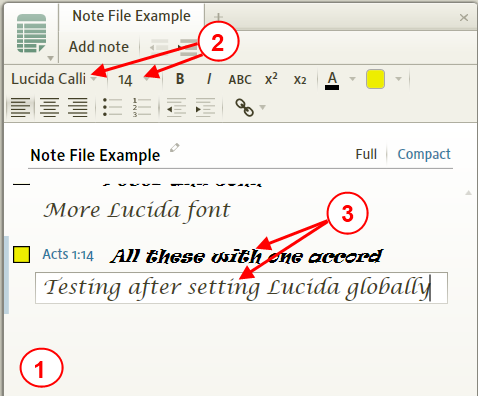
1. Click outside any edit area in a Note File (or press Esc on the keyboard with this panel active)
2. Change the Font in the Note File (i also changed the font size)
3. In another resource (i used ESV), select text. Then right-click on the text, select Selection on the right side, then clicked on Add to note 'Note File Example at the bottom on the right.
(a) entered text into the content area of the new note. Notice that L4 correctly applied the global font. i also noticed that any other open Note Files changed to this global font when adding notes to them (OK so far).
4. Now close L4 and then reopen L4.
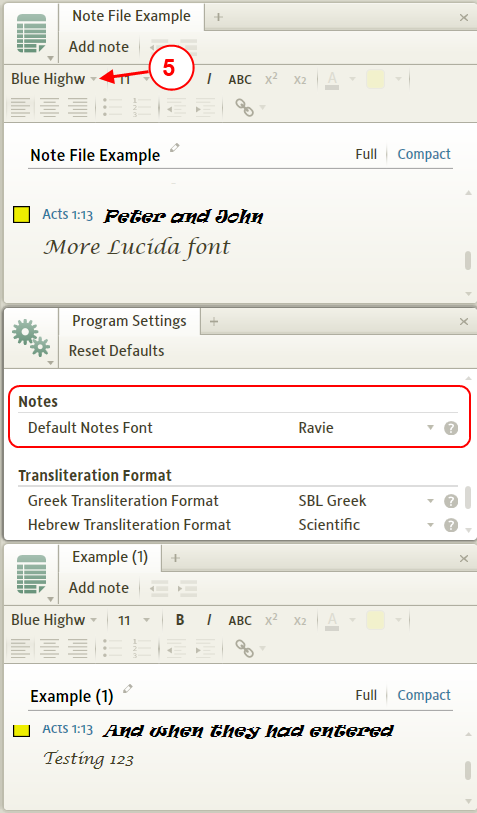
5. Notice that L4 changed the global font to something other than what was globally set prior to closing L4. Also notice that Program Settings was and is set to Ravie font. Also notice that L4 is using a font other than was last used and it is not set to default. I would expect L4 to either revert to Default or remember the last set global font setting, not some interim font setting.
P.S. I've noticed that when changing a global font setting that L4 applies this to all open Note Files. But i have also noticed that the font size is not set in the other open Note Files (isn't this also inconsistent?).
P.S.2 Please also look at my other inconsistency with Note Indicators in this post. i accidentally posted it in the General forum.