how do I make a word list word by word that I want ?
I have tried to get the list according to the word iist vocab list article but that is not working. Really considering typing it in myself to make sure I know the vocab.
William
Hi William!
With a word list open, right-click any word in a Greek or Hebrew Bible or a Reverse Interlinear such as the ESV or NKJV. On the left side of the popup menu, there is a "Add Lemma to [Word List Name]" option.
Is this what you were looking for?
Pete
Oh, on the right side of the right-click menu, you need to have the "Lemma" option selected, not "Selection" or "Reference" or any other option. Otherwise, the "Add Lemma to Word List" option will not appear.
how do I make a word list word by word that I want ? I have tried to get the list according to the word iist vocab list article but that is not working. Really considering typing it in myself to make sure I know the vocab. William
The article is for Libronix (Logos 3), thus there's no point in following it.
L4 Word Lists: File / New (left column) Word List
Then you Add words .- e.g. from a certain passage you are studying, from the clipboard etc. And you can always edit all entries for the words in your list and add new ones.
Does this help?
How do you make a word list with the manuscript form rather than Lemma? I want to build my vocab list for Hebrew words, but I want the vowels with them.
Hi Billy
Kevin pointed me to a solution for something similar - http://community.logos.com/forums/p/53295/389648.aspx#389648 - does this give you what you need?
Graham
I just tried this and I seem to be able to edit the gloss or display column, but can't edit the lemma column to add vowel points.
I seem to be able to edit the gloss or display column, but can't edit the lemma column to add vowel points.
This seems to be a bug: I just tested this in Greek lists, and the lemma column will open an edit field like the others, but the edit will only be accepted when I click on the white-blue arrow-button in it, not when I hit return. Is this the same you experience?
the edit will only be accepted when I click on the white-blue arrow-button in it, not when I hit return. Is this the same you experience
yes, this is what I get. I can edit in the Greek list because I have a Greek keyboard installed in Win7. I use Shibboleth for Hebrew cut and paste and pasting from Shibboleth into the cells under the Lemma column doesn't seem to work. by hitting the white and blue button, the changes seem to take. but it becomes a mix of Hebrew and English characters since Shibboleth doesn't seem to work.
I just tried again. If I cut and paste from the surface text in AFAT into the Lemma field then hit the blue and white arrow, I seem to be able to change unpointed to pointed words.
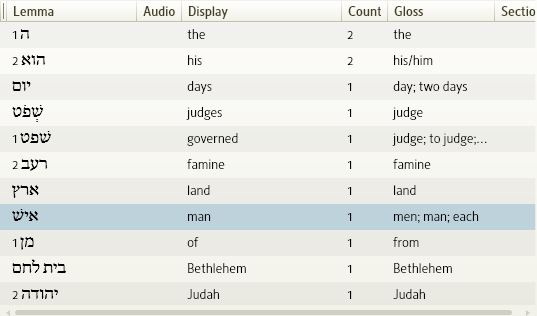
see the 4th word down שְׁפֹט for judges in this photo.
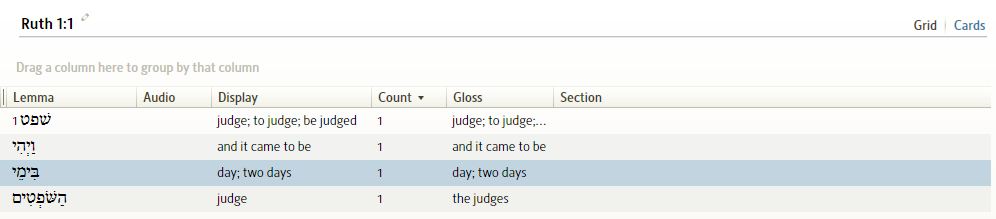
Since Hebrew has so many compound words the sample below shows where I right clicked on a word in AFAT, selected one of the lemmas represented in the compound then clicked "add Lemma to an open word list" then I copied the pointed compound word into the lemma column [hit the white and blue arrow to accept your edit] and adjusted the "Gloss" to reflect the compound form.
Remember: when making Cards from your word list it uses the "Lemma" for the front and "gloss" for the back, so those are the fields you will want to copy and paste or edit to make a personalized study deck.
Am I able to add my own list...for example I have typed out a couple of vocabulary lists in a spreadsheet program.
Maybe go back and make this lists better with time and as I study more..
Available Now
Build your biblical library with a new trusted commentary or resource every month. Yours to keep forever.