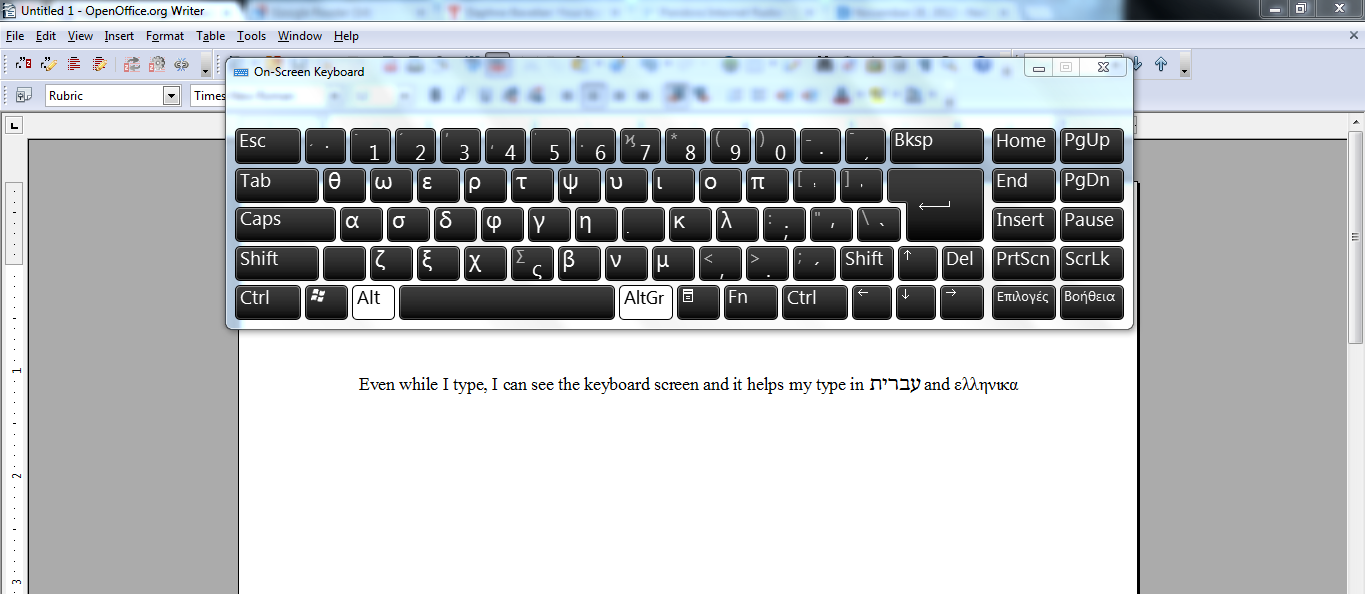
I am running Windows 7 and just downloaded and installed the transliteration keyboard from the website. I am trying to get the Logos Transliteration Keyboard to display on Windows' On-Screen Keyboard application. With the Logos Transliteration Keyboard activated, the On-Screen Keyboard displays the traditional characters with and without SHIFT. But when I try either ALT keys or a combination of ALT + SHIFT, the On-Screen Keyboard will not display the diacritical marks or other characters which distinguish it from the default English keyboard. I have replicated the problem on two computers. Despite the fact that the characters do not display on Windows' On-Screen Keyboard, the keyboard does work properly.
Contrast this with the Logos Hebrew Keyboard which does display most of the characters. One exception I have noticed is that the sin and shin do not appear on the On-Screen Keyboard where the left and right brackets are. The keys work and produce sin and shin, but they don't display as such on the On-Screen Keyboard.
Why does the Logos Transliteration Keyboard not display on the On-Screen Keyboard application in Windows, and why does the sin and shin of the Logos Hebrew Keyboard not display either? Is there a solution to making these keyboards display properly?
When I am teaching students how to use Greek, Hebrew, and Transliteration in their papers, I don't want them fumbling around for different PDF keyboard maps, I want them to be able to consult the program built into Windows that displays the currently active keyboard. Our computer lab (running Windows 7 on all machines) is about to put Hebrew, Greek, and Transliteration keyboards on all the lab computers and we will encourage our students (2000 of them) to download the keyboards we select. Logos has the most desirable layout, but without being compatible with the On-Screen Keyboard application in Windows, we will likely select another keyboard.
Does anyone know of a solution to this problem and, if not, are any of the Logos developers willing to look into this matter?
Thanks!