Ruben Gomez posted a helpful tutorial today on how to work with the so-called Q text in Bibleworks and Accorance.
Naturally I wanted to see how I could accomplish the same tasks in Logos 4.
I was easily able to create a custom Reference range by pasting the list of references and saving it as Q.
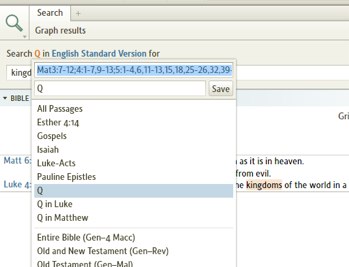
Here is a text file of the ranges used by Ruben cleaned up a bit by me. Note that I haven't checked this completely for accuracy since I am more interested in testing the functionality of Logos right now. I got this list from the Forum post on Bibleworks referenced by Ruben's post. He says they are taken from Robert J. Miller's The Complete Gospels.
3782.Q Reference Range.txt">http://community.logos.com/cfs-file.ashx/__key/CommunityServer.Discussions.Components.Files/76/3782.Q-Reference-Range.txt:550:0]
Logos was able to accept the complete list of verses so it is very easy to limit one's search to the so-called Q texts in whatever version you choose. Very good.
One thing I can't figure out is how to apply a visual filter to highlight all the Q verses. I was able to apply filters to various elements within the range I created but I could not figure out how to simply get Logos to highlight all the verses in that range. I'm sure there is a command but I have yet to find it.
Anyone have any suggestions for how to accomplish that?





