Hi Everyone,
I tried searching the forums first and couldn't find anything so forgive me if this has been answered before. I actually have two related questions. First, I was curious is there a way to turn off all community notes across all resources or must I do them individually for each resource? I thought there used to be a shortcut that brought up a menu that allowed you to set it for just that resource or all resources but I can't seem to remember what it was.
My second question has to do with the category boxes. I know that if I click on the arrow to the right of Community Notes or Notes I can click "select/unselect all" and that will remove all the check boxes and then make the notes disappear. What I don't understand is what is the purpose of the box next to the categories Community Notes and Notes? I would assume that unticking that box should make all the note files that fall under it no longer appear in the text. But as you can see in the screen shot below both my Community Notes and Notes boxes are unticked yet the notes for both still appear in the text.
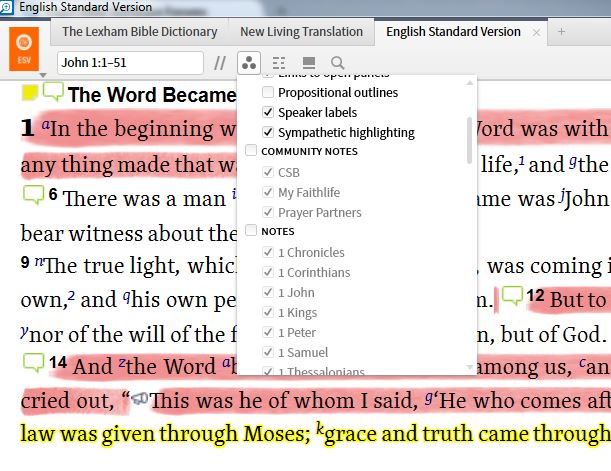
If I need to untick each note file individually to make them disappear, what is the purpose of the tick box next to the categories?
Many thanks in advance.
PS - I'm using 6.0a SR-2 (6.0.1.1328)







