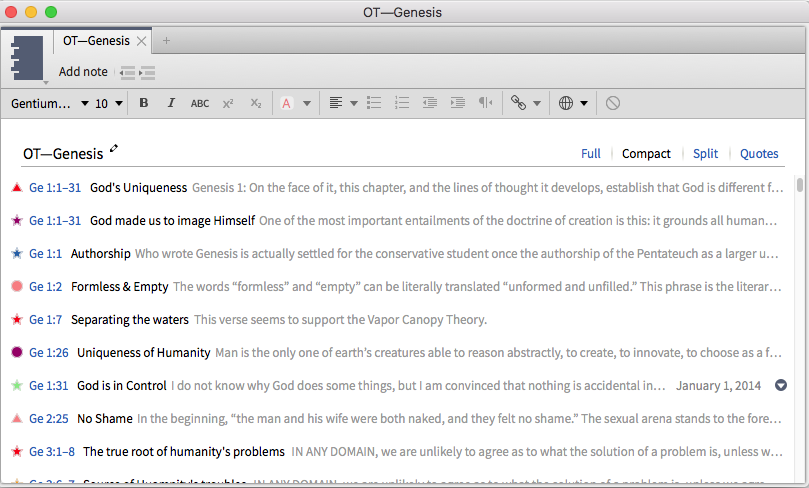
I am wondering if there is a way to permanently set the font size within a notes document? I have searched the wiki and it talks about "global settings" but I can't figure out how to set those. If that is indeed what I need to do.
Any ideas?
In a notes document—without any note active—select the desired text attributes. Now new notes will have those attributes, but it will not affect previous notes. Text pasted from a Logos resource will most likely contain the font attributes you select in Program Settings (or Logos Preferences on Mac OS).
Okay, got it. I would have liked any copying and pasting from a resource to conform to the format of the note I am pasting into. E.g., I want my notes to be in font size 11 - including any quotes I copy and paste. Otherwise, it looks all higgledy-piggledy. But I'm guessing there isn't a way to do this.
I want my notes to be in font size 11 - including any quotes I copy and paste. Otherwise, it looks all higgledy-piggledy. But I'm guessing there isn't a way to do this.
I reformat after pasting so that everything looks the same.
I want my notes to be in font size 11 - including any quotes I copy and paste. Otherwise, it looks all higgledy-piggledy. But I'm guessing there isn't a way to do this. I reformat after pasting so that everything looks the same.
Yes, that's what I do. But when you do a lot of work in Logos and frequent copying and pasting, then you are always happy if you can cut out an unnecessary action to save some time. No worries though.
I frequently copy/paste into notes in Logos . . . I want to preserve the hyperlink to the citation so, I select the text, less hyperlink, hit Ctrl+Space (also on the Menu bar) and it reformats all the the default settings.
I do the same thing.
Okay, I tried that, but it's not working for me. I copied and pasted a paragraph from the FSB into a blank, new note. As usual, the text shows up in font size 12, whereas I prefer 11. I selected the text and hit Ctrl+Space, but the text size remains at 12.
Available Now
Build your biblical library with a new trusted commentary or resource every month. Yours to keep forever.