Is it possible to remove all notes and setting from Verbum, so that it is like a brand new account?
Not possible. You have to manually delete all your documents, prioritizations and bookmarks/Favorites.
To completely remove Notes and Highlights you must use Notes tool > Trash > Permanently Delete and then you can remove any user Palettes. You cannot delete Personal Books that were uploaded, so you have to Hide them.
The majority of deleted documents will be preserved in My documents, and can be undeleted.
Yes (and no if you are compulsively accurate)
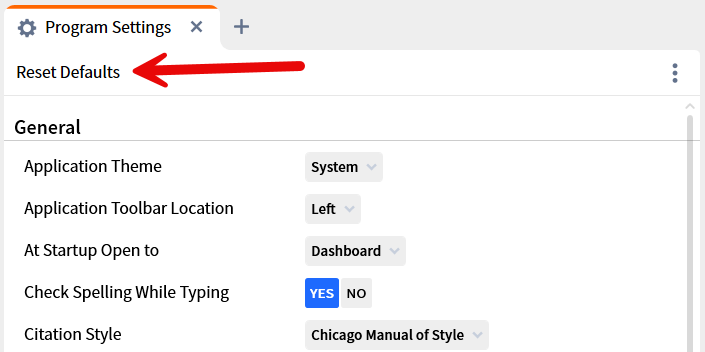
for the settings:
The select all your notes/notebooks and delete
You can now convince yourself your account is like new
HOWEVER, your documents (including notes) still exist in the cloud and can be recovered.
I am not 100% certain this wipes out your prioritization and for obvious reasons, I wasn't about to test it.
I'm stuck downloading my library and resetting defaults requires a restart, so I need to wait to see what is gone and what is not gone. Thanks!
Nope. I still have all my prioritizations and bookmarks.
A want a total wipe, if possible.
Thank you! @Dave Hooton
Available Now
Build your biblical library with a new trusted commentary or resource every month. Yours to keep forever.
Scrolling is slow. Would a more expensive phone help?
maybe 10 years ago i subscribed to a video library that offered many Christian videos - some teachings some entertainment etc. I cannot seem to find this service anymore. Can some one help me? Thank you!!! Denis
Does a document exist that shows an image of the icons used in Markers. (e.g, a picture of the megaphone and what it represents)?
My Mac is running low on disk space, and it looks like the Library/Application Support/Logos4 folder is taking 20GB in /Data and 15GB in /Documents. I'm guessing that one of those is my library and the other is my notes and highlights. Is there a way to see the size of all the things in my library so I can get rid of those…
The hyper activity grab function (which I would argue is a bug) is causing me to stop work and do something else, it is that bad. I have the ESV in one column, and the OL in another column and linked. I am trying to highlight specific words in the OL which will cause the highlight to also appear in the ESV, even though the…