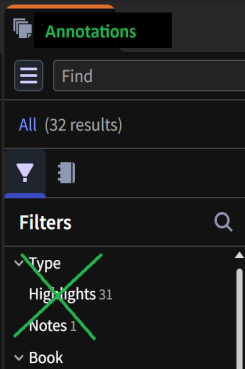
Please merge Notes and Highlights into unified Annotations. Sometimes what I begin as a note turns into a highlight and vice versa. At least offer a menu option to convert a Note into a Highlight and vice versa.
You are aware that you can add text (notes) to your highlights now? I've not tried adding a highlight to a note that already exists.
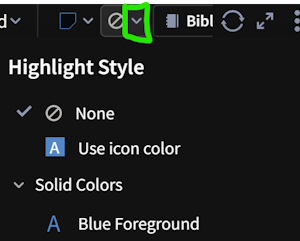
@MJ. Smith open a note and use the image below as a reference to apply a highlight. Since it is possible to add text notes to highlights and apply highlights to notes, it would be logical to unify both into a single annotations system.
Notes → Annotations
They actually are a single system … there are many requests to separate them completely. Because of those requests, I can support requests to make it more obvious they are a single system but cannot support a requests that makes it impossible for people to pretend they are separate. But that is just my personal opinion.
Available Now
Build your biblical library with a new trusted commentary or resource every month. Yours to keep forever.
Please allow left text justification in the Android mobile app. It's not an optimized reading experience with the full justification forced on us with all of the irregular spacing required for it.
I'd love to see Logos build an MCP (Model Context Protocol) server so users can connect their Logos library directly to AI tools like Claude, ChatGPT, and others. Right now, Logos and AI assistants are completely siloed. An MCP integration would let me query my commentaries, lexicons, and original language resources from…
As a pastor, nothing is more important to me than sermon preparation. Being able to write and edit text on my phone would save time and greatly improve my focus. Would it be possible to release this feature for mobile use? I know it is already available for tablets, but let's face it... it’s the phone that is always at…
Logos Development Team, I am a long‑term Logos user and recently subscribed specifically to gain access to the Study Assistant. Overall, I have been very impressed with the tool. However, I immediately noticed that the inquiry text box has a very restrictive character limit. As a real‑world example, I completed the first…
Having granular control over the image quality upon conversion would be great. I'm finding that text is fuzzy after import when it's clear in the PPT file.