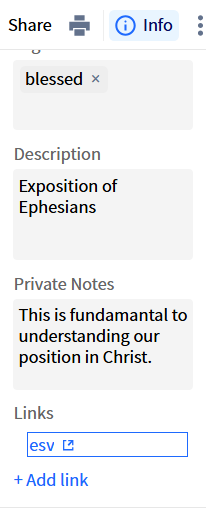
Logos Bible Software documentation suggests that I can insert a link (L4) in a Bible Study Builder block. As I understand it, L4 URLs are depricated. Is there an alternative way to insert a Logos link in a Bible Study Builder block?
Thank you!
Ralph
I just tried to put a hyperlink into a Bible Study document, and was not successful. I'm curious to find out the answer to this, as well.
It is one of the many deficiencies that prevent me using this tool for Bible Study classes! Links are restricted to the Info sidebar
Dave,
Thanks for the confirmation. We must hope that the ability to insert links into a Bible Study Builder block will come at some point. In the meantime, I'll stick with Notebooks…
Jonathan,
Dave has confirmed it for us. Back to Notebooks until links can be added to Bible Study Builder blocks…
Thank you @Ralph Gibson III
I'm still hoping they put auto indenting in the notes on the Mobile Appsauto-indenting, but last I heard, they have no plans on doing so.
Available Now
Build your biblical library with a new trusted commentary or resource every month. Yours to keep forever.
I do a lot of traveling and I have no access to Internet in some cases. Is there a downloadable version of the app?
I would have sworn that at one time I had insights and translations showed as 2 tabs in the same sidebar but now I cannot tab between them, if I open one it closes the other … which makes switching between them a multistep process. I, personally, consider this an unacceptable design/regression but don't know how others…
I have some highlights in my Bible that appear on my desktop app (MacOS) but not my mobile app that refuse to erase no matter what I do. I’ve tried everything I know. Anybody else have this problem and know how to help? I feel like I got a little too highlighter happy at first and now in some places it’s distracting but I…
Is it possible to change the default note anchor to a basic bible reference? When I currently make a new note, it defaults it to the Bible translation(NASB) instead of just the passage that could be seen in any translation.
Wanting the full text to show in my notes of my scripture anchors. To me there’s isn’t any rhyme or reason as to when it shows full text vs just the reference. I have tried every which way but sideways and can’t for the life of me find a way for the full text to show consistently. I select/highlight exactly the same way…