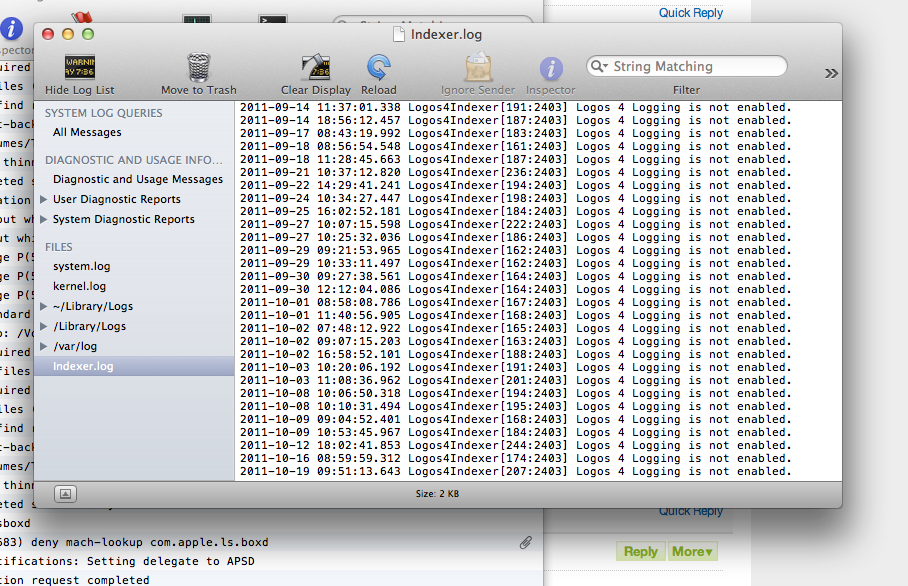
Having a problem crashing just after hearing the opening music and seeing (briefly) my layout.
logos will not even open for me right now -- this has never happened before.
it tries to open, and then just shuts down.
I get to the tone, see my layout, and it shuts down.
Well I took the trouble to scroll to the bottom of the screen - and I still can't give you any advise other than to check the Wiki - blue writing on top of the screen and have a look at 'How to report bugs"
Don't forget to turn on logging.
Mine is doing the same thing as Peters. I get to the tone, see the layout and then crash. Is this an issue with Lion?
Here are the log files as per the instructions8233.Logging.zip
Just wanted to say I have the same problem. I hear 2 notes of the Logos startup music and then it crashes to desktop.
Well, I found out that it works fine in offline mode. Something must be goofy with the servers.
Mike, I thought I had followed the directions about logging in the link you sent me to. I put in the terminal commands and it showed logging was on. Not sure what was happening there.
Here's the log:
Please attach crash report and log files (instead of copying and pasting crash report contents). Apologies: from crash report, know OS X Lion 10.7.2 being used and Logos 4 crashed.
Option: can edit post to remove log contents, then attach file. Wiki Using the Forums => Editing or deleting posts and => Adding a picture to a Post
Would like to look at Logos 4 diagnostic logs along plus description of what was being done in Logos 4 Mac that crashed (e.g. launch to Home Page, open a Passage Guide, ...)
Wiki Mac Troubleshooting => How to Report Bugs in Logos 4 Mac includes link to 5504.Logos4MacLogging.app.zip (display logging setting, then optionally change); also links to Logos Log Scribe (create zip file of Logging folder with copy of console messages)
Other option is contacting Logos Mac Support => http://www.logos.com/about/contact With your permission, Logos can connect with desktop sharing.
Keep Smiling
I am having the same issue as well!!
Here is the latest log. As far as I know, logging is ON
Program works fine in off-line mode.
8231.Logging.zip
Same issue here
I'm in the same boat.
I am having the same issue. Just in case anyone is keeping score.
Would some of you guys having the same problem try logging in in offline mode and see if that works. If so, my guess is that the problem is at least not on our end.
Hit the dock icon for Logos and then immediately hit the command key. Choose off-line mode.
I have the same issue, crashes on startup right when the opening sound starts to play.
Here is the latest log. As far as I know, logging is ON Program works fine in off-line mode. 8231.Logging.zip
Logos4.log file does not have a crash; appears to be checking resources for update(s) to download.
If crash repeats, please compress Logging folder and reply, attaching archive.
Due to some memory leakage issues, may need to restart Mac.
Also aware some OS X Lion users are encountering a crash, then able to open and use Logos 4 Mac.
Apologies: personally not have OS X Lion (yet), so unable to replicate crashes.
Keep Smiling [:)]
Mine is crashing as well. What worked for me finally was to hold down the command key when starting logos. When the login screen appears, select offline mode. It's not connected to the internet, but at least it opened up for me.
I can log in as well in offline mode.
Wiki Logos 4 Keyboard Shortcuts For Mac includes: "Sign In tip: launch Logos 4, then quickly press and hold command key until Sign In appears – can click “Use blank layout”, then Sign in"
Using command key during launch also enables diagnostic logging for that session (Logos4.log file). For indexer diagnostic logging, need to enable Mac Diagnostic Logging
If crash repeats with diagnostic logging, please attach archive (compressed) file with diagnostic logs.
Doing this just results in a crash. At this point, the fix seems to be working in off-line mode until Logos fixes something on their end. That's my suspicion.
Same issues here...crash right after music.
I am working with it online -- I just had to fire it up offline first. Then log on.
I reported this to Logos Tech. support last week.
Only fix known at this time is to stay in offline mode.
If internet is enabled, may experience crash and have to reopen, then may find Logos presents in small or long narrow box, but will "generally" open if restarted.
Doing this just results in a crash. At this point, the fix seems to be working in off-line mode until Logos fixes something on their end.
Concur. Able to replicate sudden crash using Logos 4.5 Beta 2 on Mac OS X Snow Leopard. Also learned opening to a blank layout with online connection crashes, zip file has diagnostic logs and Apple crash report:
5488.09-crash.zip
Wondering if security certificate(s) modified ?
Suspect you are all having the same issue as has been identified in my thread - http://community.logos.com/forums/t/39842.aspx
Thanks, Patrick.
Just upgraded to OS Lion and am having the same probleme.
Having same problem.. Offline mode works. Thanks for advice, Peter. Did speak with tech support and they said one of their servers is having problems at the moment which is causing the problem.
Starting in offline mode is the temporary solution they recommend with the understanding that your work such as notes, etc, will not be backed up until you go back online.
I'm having the same problem as well, running OS X Lion.
Here's my log, as well as my crash.txt.
0247.Logos4.log.zip
0576.Logos4_Crash.txt.zip
I take that back, mine's up and running again. Is anyone else's back up?
There are server problems, so nothing wrong (i guess) with your Logos4 installations. I have indexing problems and the tech service is helping me but is postponing it now because of the server problems. Have some patience, give it some time, they will solve the issue soon. In the meantime you can work offline
Its been going on for sometime now actually. A lot of different responses depending on what version you have, what operating system ( lion or not etc ) and what resources you have.
Many saw no problems and, still do not, that have not downloaded a lot of new resources lately.
When I talked to tech support last week, they were already aware and did not have any idea when this would be resolved as the actual "cause" was still under review.
After getting all of my resources up to date, files corrected, indexing redone, then doing a permissions repair ( again ) on my Mac, I can indeed open Logos with interment on, it will crash once, then re-open, get a very small screen, then re-open and Logos will talk to the servers just fine. I repeat, Logos will talk to the servers just fine.
Because I can do these exact steps each time and have Logos: "update, move notes, do what it is supposed to do" I have very real concerns that this is indeed NOT a server issue, but something in the code on local machines and it's ability to connect to the server.
The steps for me are the same each time, works each and every time, is consistent and predictable.
I do not see any reports of this same problem over on the Logos for Windows side, does anyone know if Mac and Windows users are are totally separate servers?
Hopefully this report will help Logos with troubleshooting the issue.
Just for the record, I'm having this same problem right now. I cannot find my log file at all! Followed the above directions. I don't know if this works in offline mode, because after the signing in, it goes to the main screen with the spinning wheel and runs for a few seconds then crashes. I've been able to get to the preferences in that time period and tell it to not download automatically and another time to not use internet, but still crashes within a few seconds.... This is very frustrating.
The attached picture shows what I see before the crash....
I cannot find my log file at all!
Rog - Sorry you are having problems! Have you enabled Logging? See HERE for more info. If you are on OS 10.7 (LION), the "Library" is hidden. To reveal it:
Available Now
Build your biblical library with a new trusted commentary or resource every month. Yours to keep forever.

![Photo of [Deleted User]](https://secure.gravatar.com/avatar/b6e5eb7d5834f938188b94f77b3d8df7/?default=https%3A%2F%2Fus.v-cdn.net%2F6038263%2Fuploads%2Fdefaultavatar%2F249DUY2CN6F8.jpg&rating=g&size=200)