Please bring a dark mode/theme to the web app.
70 year old eyes do not do well with a blinding white screen
PLEASE. YES. PLEASE. MY. EYES. ARE. BURNING. help.
Yes, please.
I exclusively use the web app since I run Linux, and I'm disappointed that dark mode is not an option there. The web app also doesn't play nice with Dark Reader extention for Chrome (which wouldn't be an issue if the web app had its own dark mode). I would appreciate adding Dark Mode to the web app.
I've gradually moved to using the web app almost exclusively because of portability. It's 2025, please allocate some resources to getting a built-in dark mode.
My tablet is not supported by the app so I am using the Samsung browser in dark mode. It usually works great for night time reading. (I have a different browser in normal mode as my standard browser.) However, the bookpages are still white. I would prefer if I didn't have to find add-ons, etc for this.
Agreed. Dark mode was a game changer when it first came out. I remember having to do High contrast on windows before it really caught on. I hate the bright colors. They definitely mess with my vision.
The web app is very rich, but it lacks dark mode. My sensitive eyes would really appreciate dark mode to be brought to this form too for use on a ChromeBook. Thank you!
@A. Jacob W. Reinhardt does using the web browser's own dark mode not work for you?
For clarity, the web browser dark mode doesn't touch the whitepace inside the page. The feature idea is for Logos to respect the Browser's dark mode setting but it doesn't right now.
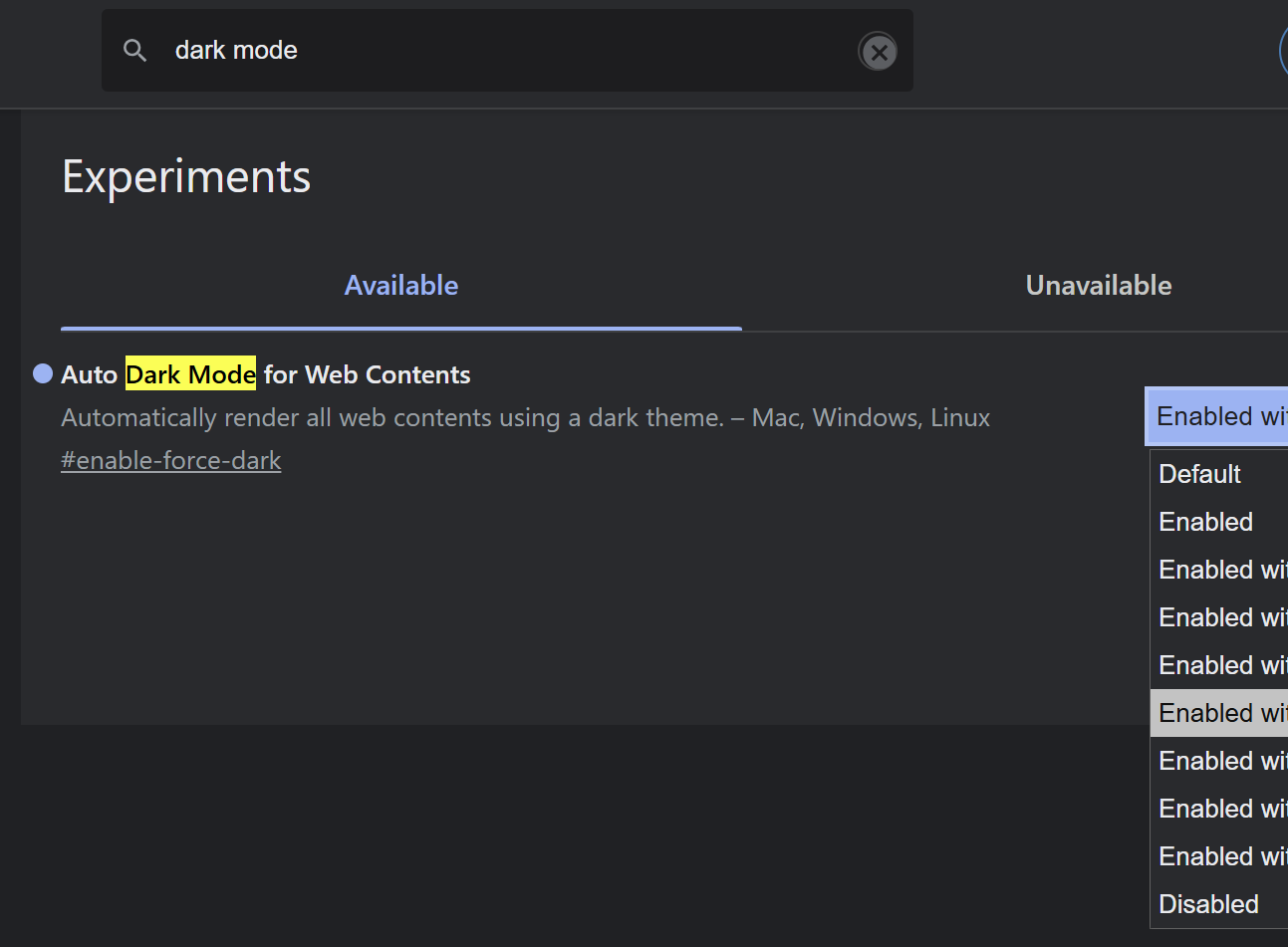
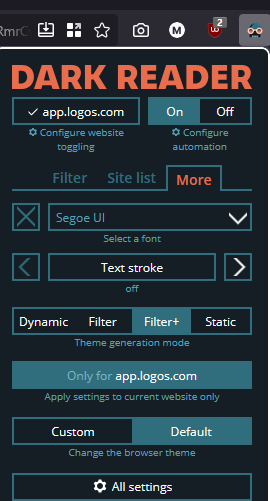
YES, PLEASE. WE NEED THIS. Currently having to use a chrome extension "Dark Reader" to force dark mode on web app.
Please add this already. We really need this feature.
Workaround until Logos turns to the dark side…
Microsoft Edge
FYI, in Firefox using the Dark Reader extension, I had to use the Filter+ theme generation mode to get full dark mode. Click More → Filter+ in the "theme generation mode" section
This works!!
I also exclusively a Logos Web user because I run Linux. As such, native dark mode support in Logos Web would really improve my experience with Logos.
Yes, please…
I would like to install Logos for Web as a Chrome Web App and uninstall the Logos Windows app. The lack of a dark theme for the web is the only barrier. Please provide an estimate of when we may receive this functionality.
Available Now
Build your biblical library with a new trusted commentary or resource every month. Yours to keep forever.
It would be helpful if e-mail about various stages of the Pre-Pub process had different subjects. Currently, all such messages have a subject in the form of "Your Pre-Pub Order from Logos.com" so it doesn't distinguish. How about e.g. "Thank you for your Pre-Pub order from Logos" "Your Pre-Pub Order has been Cancelled"…
Hello Logos Support Team, I'd like to request that the verse memorization tool currently available in Logos desktop be added to the mobile app. This feature would be incredibly valuable on mobile since it would allow me to practice and review Scripture memory while I'm on the go - during commutes, waiting in line, or any…
Hi, I was directed to submit a BUG by your 'Chat' feature. I hope it's the right place to address my issue. Both BECNT and WBC commentary series have off-norm 'link set' link behaviour. For example, BECNT James (McCartney, D. G. (2009). James. Baker Academic) accurately points to the commentary in 'Exegesis and Exposition'…
Would it be possible to change the Bible translation heading from (AMP (2015)) to (AMP 2015)? The extra parantheses in the original heading looks cluttered.
I bought this book https://www.logos.com/product/55445/a-year-with-the-angels-daily-meditations-with-the-messengers-of-god?queryId=8d8cac57caa4d4343035bee59532a1ea thinking I'd put it on my Logos Desktop and read it daily, but it didn't show up as a daily devotional. I figured out that it's probably because this book is…