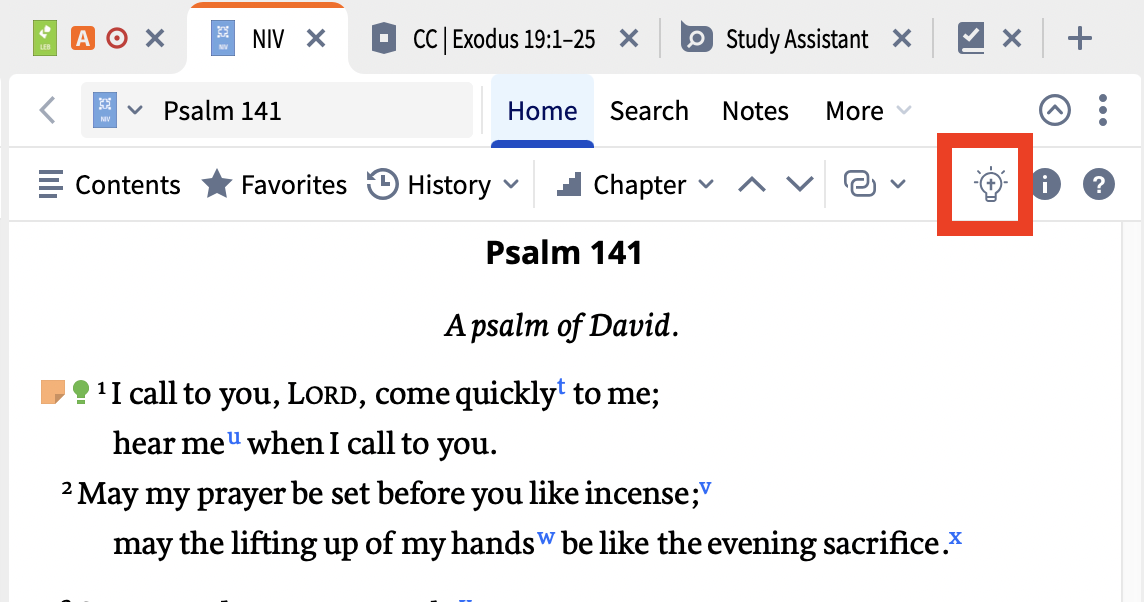
Opened my Logos to Bible. My lightbulb is missing. The Insights Panel is supposed to open with Shift Command B but it produces no response.
Welcome @Allan Meyer
The Insights Panel is supposed to open with Shift Command B but it produces no response.
I've just tried this and it worked for me.
Which Logos subscription level (if any) do you have? I don't know if that's relevant at the moment but worth checking.
And are you saying you don't see the Insights sidebar icon in the toolbar?
Graham
There was a problem with the short cut - I've forgotten which version in the last couple of weeks fixed it. You are on the Home tab with a wide enough panel to show the light bulb, I assume.
@Graham Criddle I'm on the latest 49.0.144 and still have this issue. I'm on Legacy Edition. It works on the webapp.
Hi @CJ Wilson
I'm on Legacy Edition. It works on the webapp.
I believe, but am not certain, that while this feature does require a subscription on desktop it is available to everyone on the web app.
@Graham Criddle I believe you are correct. I believe it requires a subscription. I thought this might be one included in the LFL, but he would have at least needed to subscribe first.
Available Now
Build your biblical library with a new trusted commentary or resource every month. Yours to keep forever.
The Books of The Bible from the International Bible Society presents the biblical text visually according to its natural literary outline Christopher R. Smith, “What They Don’t Tell You in Church: Chapters & Verses,” ed. John D. Barry, Bible Study Magazine: July–August 2009 (Bellingham, WA: Lexham Press, 2009), 47. I was…
How to insert a PDF file into a Note?
Hello, I am trying to find out whether the Biblical Phrases dataset can be used to create a Visual Filter. What I would like to do is this: whenever a biblical phrase identified by the Biblical Phrases dataset appears in a Bible, I would like that phrase to be highlighted automatically. I checked the documentation for…
I have two frustrations that keep appearing, both related to Logos not remembering view settings. The markings for sermon documents continue to show up in Bibles even though I selected "Do not show in any books" (macOS). There's no keyboard shortcut for these options and the toolbar requires four clicks to select the…
Sorry for the repeat. This got cancelled accidentally. I would like would the RefTagger ToolTip to print more words before giving up and "last word…". Some others even resort to a scroll bar allowing the viewing of much more. Does anyone have any suggestions, or know of any place I could get some help? Thanx for you time.